Illustrative engineering scenario
This is a conceptual example of how we would approach a representative problem. It is not a published client project or a claim of delivered results.
The short version
Adaptation should remain inspectable and accessible; integration with an LMS is a starting point, not proof of educational benefit.
The decision in this scenario
Imagine an institution that wants to adjust learning pace without replacing the LMS used for courses, grades and staff workflows. The question is not whether software can reorder lessons. It is whether pacing decisions are explainable, accessible and reversible for the learner and instructor. This is a conceptual example, not a claim about student results.
A defensible starting approach
We would add a small pacing service beside the LMS and use supported integration points rather than replacing course infrastructure. 1EdTech's LTI specification describes standard integration between an LMS and external tools, but actual data and write capabilities depend on the platform and enabled services. Begin with a recommendation that an instructor can inspect, not automatic reassignment of a student's path.
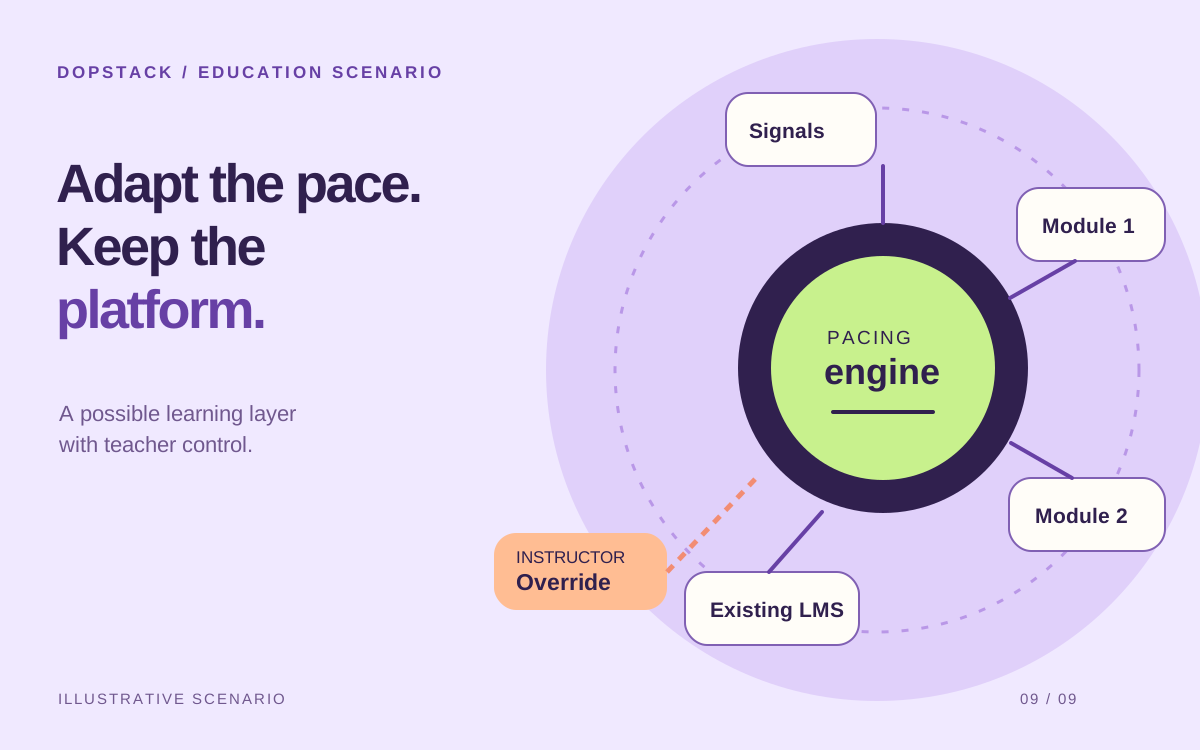
Illustrative learning loop
Add pacing around the LMS already in place.
Existing LMS
Lessons and progress
Signals
Interpret cautiously
Pacing rules
Recommend a sequence
Instructor
Review and override
Define what a pacing signal can and cannot mean
Time on a page may indicate engagement, confusion, an open tab or an accessibility aid. It is a weak signal on its own. Prefer a small set of explainable rules based on evidence the institution already understands, then let instructors override or correct recommendations. Do not label a student as unable to progress because a proxy metric moved.
Decide how progress, course structure and recommendations cross the LMS boundary. If an integration cannot write the required state reliably, show guidance in the companion tool rather than pretending it has changed the official course record.
Design the alternate path from the first wireframe
An adaptive interface still needs predictable navigation, readable content and controls that work without a pointer. W3C's WCAG 2.2 Understanding documents explain success criteria and their intent. Use them during design and testing, not as a badge applied after a visual review.
The tradeoff is less automation in the first release, but more trustworthy operation. Test with learners and instructors, include accessible alternatives to visual progress cues, and plan for term-start traffic. The system should help people make decisions, not hide a consequential rule behind a score.
Evidence: W3C WAI: Understanding WCAG 2.2
What the team would need to build and prove
- Verified LMS integration for the specific data and actions required
- Explainable pacing recommendations with instructor override
- Accessible navigation and nonvisual progress cues
- Term-start capacity testing and support procedures
- Evaluation of learner and instructor corrections before automation
What success would mean
Success would mean recommendations are understandable, instructors can override them and the LMS remains the authoritative course record. The scenario makes no claim about improved engagement or completion.
Technologies in this example
- React
- Node.js
- PostgreSQL
- AWS
Sources & further reading
- 1EdTech: LTI Advantage Implementation Guide
Primary integration guide; individual LMS implementations and enabled services vary.
- W3C WAI: Understanding WCAG 2.2
Primary accessibility guidance; conformance would need product-specific testing.
Written by Dopstack Technologies
We design and build software, cloud infrastructure and AI workflows. These notes explain engineering decisions; illustrative scenarios are not claims of client results.
Meet the team