Docker exec format error: inspect the binary too
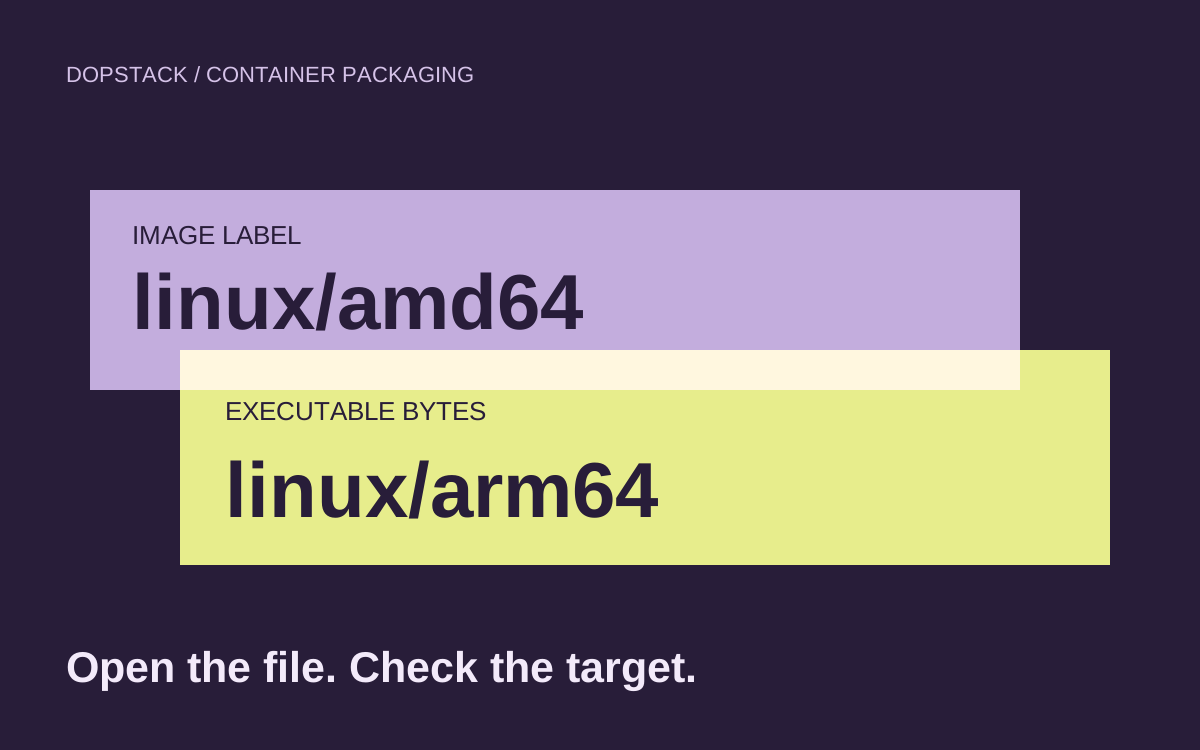
An image labelled amd64 can still contain an arm64 program. Follow the selected digest down to the file the kernel actually executes.
Quick answer
For Docker exec format error, compare the Docker daemon’s platform, the registry image’s variants and the selected local image. Then inspect the actual entrypoint file. A matching image architecture label does not prove the executable was compiled for that CPU. Rebuild the mismatched artifact or fix the script interpreter, and verify the exact published image on its intended native target.
On this page
For Docker exec format error, inspect the executable as well as the image’s architecture. First identify the Docker daemon and exact image that failed. Then determine whether the entrypoint file has the right binary format or script interpreter. Rebuilding with a platform flag only helps if the build also produces the correct program inside that image. [1][3][7]
What failed before the application could log?#
Before the worker can print a log line, Linux has to load its entrypoint. Linux documents ENOEXEC for an unrecognized executable format, a wrong architecture or another format error. A missing script or ELF interpreter is a different error category, ENOENT. Keep the runtime’s complete error text: not every failure before application logging has the same repair. [7]
Scenario: an illustrative report worker. A developer compiled report-worker on an arm64 workstation, copied it into a Linux image advertised as amd64, and deployed that image to an amd64 runner. The registry accepted the image, but the runner cannot execute its program. This is a packaging counterexample, not a claim about a current Buildx defect or a measured production incident.
Scenario: Use a diagnostic environment that can reach the Docker daemon and inspect the failing Linux image. Commands use Docker’s current documented CLI observed on October 21, 2026. The placeholders identify your registry and release; replace them before use. Windows containers and architecture-specific native libraries need additional checks beyond this Go example.
Which runtime and image did you actually inspect?#
Start with the daemon serving the failed workload. A CLI on your laptop can point at a remote Docker context, so the laptop’s CPU is weak evidence about the daemon. Record the selected context, server platform, immutable release identity and failure path. Keep an image-index digest distinct from a child manifest digest: the index can describe several platform variants. [1][2]
# Run against the Docker context that owns the failing container.
docker context show
docker version --format '{{.Server.Os}}/{{.Server.Arch}}'

# Placeholder: set the actual immutable release reference.
image_ref='registry.example.com/team/report-worker@sha256:REPLACE'
docker buildx imagetools inspect "$image_ref"
docker image inspect "$image_ref" --format   '{{.Id}} {{.Os}}/{{.Architecture}} {{json .Config.Entrypoint}} {{json .Config.Cmd}}'
imagetools inspect reads the registry object; image inspect reads the image available to your daemon. If local inspection cannot find it, pull the intended platform variant in your diagnostic environment and record what was selected. Do not quietly switch to a mutable latest tag to make the inspection succeed. For an existing failed container, also record its image ID and any command override. [2][3]
Scenario: A registry index with no suitable platform variant is one branch. A suitable variant whose local configuration says amd64 is another. In our case, that second observation still leaves the program unexamined. Metadata describes the image; the kernel executes bytes from a file. An externally compiled COPY input can cross that boundary with the wrong target.
How can you inspect a container that will not start?#
Create a diagnostic container without starting it, then copy out the executable. Docker documents both operations: create prepares a container without executing it, and cp works with stopped containers. Use an isolated diagnostic environment and the actual executable path from the image configuration, accounting for entrypoint scripts and runtime command overrides. [4][5]
# image_ref must identify the selected image under investigation.
work_dir=$(mktemp -d)
container_id=$(docker create "$image_ref")

# Illustrative path: replace it with the actual entrypoint file.
docker cp "$container_id:/app/report-worker" "$work_dir/report-worker"
file "$work_dir/report-worker"

# For an ELF executable, use readelf where available.
# readelf -h "$work_dir/report-worker"
# readelf -l "$work_dir/report-worker"

# Remove only this newly created diagnostic container.
docker rm "$container_id"
Scenario: Inspect the copied file without executing it on the diagnostic host. In our synthetic case, the decisive finding would be an AArch64 executable under an amd64 image configuration. If file reports a macOS Mach-O program, the mismatch includes the operating-system format. An x86-64 ELF file moves the investigation toward its interpreter, linked libraries or the script that launches it. Those are possible findings to test, not output captured from this fixture.
| Observation | What it establishes | Next check |
|---|---|---|
| Index lacks the runtime platform | No intended variant is advertised | Build and publish the required variant |
| Image says amd64; program is arm64 | Packaging and executable targets disagree | Rebuild the program for the target |
| Program is a script | Execution depends on its interpreter line | Inspect first bytes and interpreter presence |
| ELF target matches; loader is missing | CPU match is insufficient | Inspect interpreter and runtime dependencies |
| Only an emulated run passes | Compatibility was tested under emulation | Repeat on the intended native target |
If the entrypoint is a wrapper, follow the file it invokes. A valid shell script can successfully start and then call the wrong binary. Conversely, a failed top-level script may never reach the program you expected to inspect. Preserve the path named by the actual error so that a convenient /bin/sh smoke test does not replace the original failure.
How should the build produce the target executable?#
Make the application build follow the requested target rather than the developer workstation. Docker exposes BUILDPLATFORM and target build arguments for this purpose. Our small Go example compiles a standard-library-only worker in the builder stage, with CGO disabled, then copies its Linux executable into a target runtime stage. The variable scope matters: redeclare the target arguments inside the stage using them. [1][6]
package main

import (
    "fmt"
    "runtime"
)

func main() {
    fmt.Printf("report-worker %s/%s\n", runtime.GOOS, runtime.GOARCH)
}# syntax=docker/dockerfile:1
# Example tag: pin an approved toolchain digest in your own build.
FROM --platform=$BUILDPLATFORM golang:1.26-alpine AS build
ARG TARGETOS
ARG TARGETARCH
WORKDIR /src
COPY main.go .
RUN CGO_ENABLED=0 GOOS=$TARGETOS GOARCH=$TARGETARCH go build -trimpath -o /out/report-worker main.go
FROM scratch
COPY --from=build /out/report-worker /app/report-worker
ENTRYPOINT ["/app/report-worker"]The final stage does not force linux/amd64 in FROM. A fixed platform can make the runtime stage disagree with the intended multi-platform build; Docker’s build-check guidance recommends a command-line target or suitable variables. The builder stage is deliberately different: it runs the compiler on BUILDPLATFORM while asking that compiler to emit the target program. [8][1]
CGO_ENABLED=0 suits this tiny program. It is not a general prescription for applications using C libraries or platform-specific dependencies. Those builds may need a target compiler, sysroot, native build nodes or emulation. Docker documents these as separate build strategies and notes that emulation can be slower for compute-heavy work. Choose a strategy that can actually produce and test your dependencies. [1]
# Example only: this pushes to your registry when you run it.
docker buildx build   --platform linux/amd64,linux/arm64   --tag registry.example.com/team/report-worker:canary   --push .

docker buildx imagetools inspect   registry.example.com/team/report-worker:canary
Scenario: After pushing the index, test each program on its intended native target. Record the resulting immutable reference and run that release on representative native amd64 and arm64 targets. For this demonstration, the expected program line names the runtime’s OS and architecture. For a real worker, add a small application-level task that exercises the libraries and files the production job needs.
What if the entrypoint is a script?#
Check the file’s first bytes and interpreter path before changing architecture settings. An exec-form Docker entrypoint does not invoke a shell for you. A script intended for direct execution needs a usable interpreter declaration; its interpreter must exist in the image. Check line endings and encoding too, then distinguish format rejection from a missing interpreter or permission failure. [6][7]
For a shell wrapper, use a real shebang such as #!/bin/sh only if that shell is present, and finish with exec when the wrapper is intended to hand control to the application. Do not add a shell to a scratch runtime solely to conceal a wrong executable. If the application uses an ELF dynamic loader, inspect the loader named in the executable and ensure the runtime provides the compatible dependencies. [6][7]
The multi-stage runtime-boundary guide examines what belongs in the final image. If Kubernetes never gets as far as starting a container, use the ImagePullBackOff investigation to inspect the node-to-registry path first. A pulled image and an executable process are separate milestones.
Questions about Docker platform failures#
- Does --platform translate a binary copied from my laptop?
- No. A platform target does not rewrite arbitrary executable bytes supplied to COPY. Make the application compilation produce the intended OS and architecture, or select the matching prebuilt artifact. Then inspect and test the actual executable inside the resulting image rather than relying on the image configuration alone. [1][6]
- Why can the image run locally but fail on a server?
- Your local environment may select another platform variant or provide emulation. It may also use a different tag value or command. Compare immutable image identities, daemon platforms and the exact entrypoint on both systems before concluding that the server has a Docker installation problem. [1][2]
- Should I install emulation on production to fix this?
- Treat that as a separate runtime decision. First establish whether the service is meant to run natively and whether the release contains the correct executable. Emulation can be appropriate for a defined compatibility need, but a passing emulated run does not demonstrate the native behavior you intended to deploy. [1]
- Can I debug a scratch image without a shell?
- Yes. Docker can create a container without starting it, and docker cp can copy a file from a stopped container. Inspect that file using tools in your diagnostic environment. This approach does not require adding a shell or debugging tools to the production image. [4][5]
- Does a matching CPU prove the runtime is complete?
- No. The executable can require an interpreter or dynamic loader absent from the filesystem. Architecture also does not prove that configuration, certificates or application files are present. After the format check, run a representative task against the exact release and verify its dependencies on the intended native target. [7]