Terraform state lock errors: a safe recovery checklist
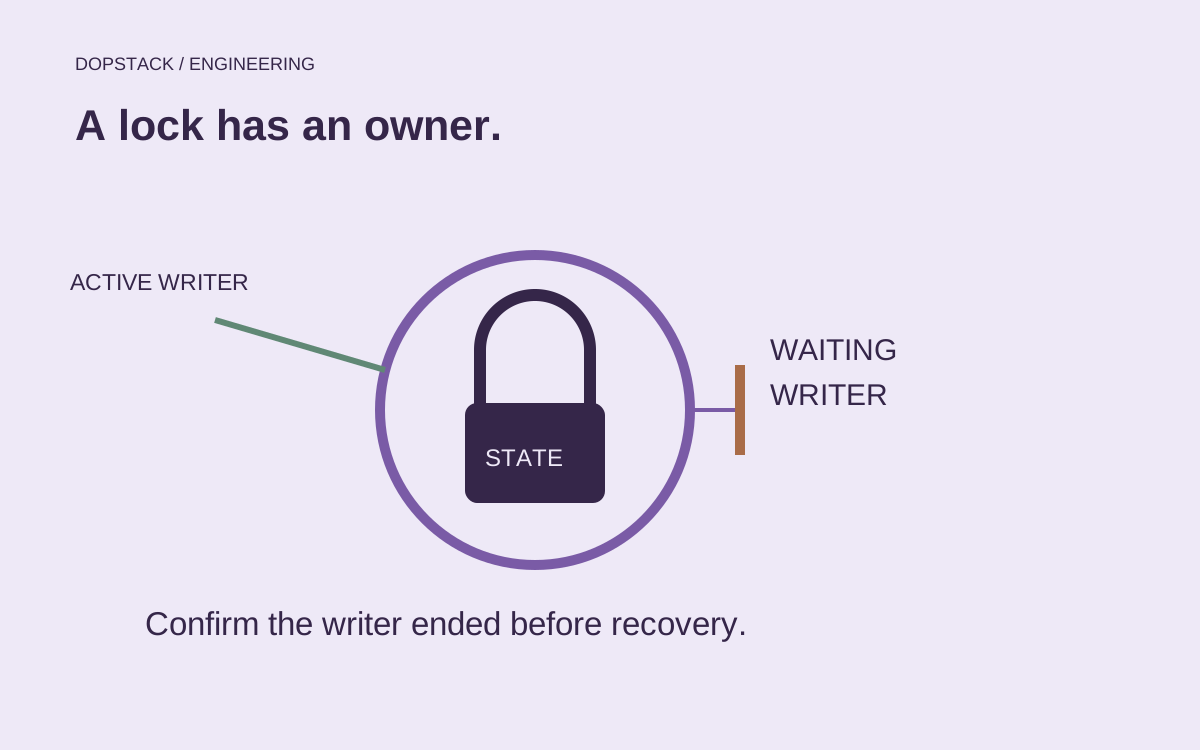
A lock error is a concurrency signal. Establish who owns the state before deciding whether anything needs to be released.
Quick answer
When Terraform cannot acquire its state lock, first identify the backend, workspace and run that owns it. Wait for an active operation rather than bypassing locking. Consider manual lock recovery only for your own abandoned lock after confirming its writer has stopped. Recovery should end with a fresh plan and restored serialization.
On this page
When Terraform cannot acquire a state lock, first identify the process that owns the same state and workspace. Wait for a healthy writer. Consider manual lock recovery only after confirming that your own writer has ended and automatic release failed. Bypassing locking can allow competing state writes. [1][2]
The deployment timed out. Is its writer actually gone?#
Imagine this illustrative incident: a CI job reaches its timeout, a second job starts, and Terraform reports that the state is locked. The tempting conclusion is that the first job left a stale lock. But a timeout in the orchestration layer does not, on its own, describe what happened to every process it launched. Before touching the lock, trace the run to its executor and establish whether any Terraform operation can still write.
State scope: production/network
Workspace: production
Lock ID: example-lock-id-not-for-use
Operation: apply
Reported owner: ci-runner/example-run
Run evidence: cancellation acknowledged; executor termination checked
Recovery decision: pending backend and owner verification
This record is illustrative, not copied from a Terraform error or a customer environment. Actual error formatting and fields vary. Its purpose is to keep the investigation anchored to one state scope. Two repositories can target the same state; two jobs called production can target different state objects. Match the configured backend location and workspace before deciding that a familiar job owns the reported lock.
Stop new contenders for that scope while investigating. Otherwise a recovery action can be followed immediately by another uncoordinated writer, leaving you to reconstruct which run saw which configuration. Preserve the original error and execution reference. You need enough evidence to explain the action later, without copying state contents or credentials into an incident chat.
Conceptual illustration
A lock error is a question about ownership
Writer still active
Wait or coordinate a controlled cancellation
Writer status unknown
Keep investigating; retain protection
Your writer ended
Check backend recovery procedure
Normal locking restored
One fresh plan, one authorized writer
The distinction matters even when the fix takes only one command. Removing an abandoned lock restores a coordination mechanism. Removing a live lock defeats it. The visible action is similar; the evidence that makes it appropriate is different. HashiCorp explicitly limits the recovery operation to your own lock when automatic release has failed. [1]
Is another Terraform run still active?#
State locking protects operations that can write state, and support depends on the selected backend. Read the lock information and compare it with deployment activity. The relevant scope is the actual state object and workspace, not just a repository name or the environment printed in a job title. [1]
Pause new runs for that scope and find the owner. Record the state location, workspace, reported lock identity, operation and execution reference. Ask whether a local operator, pipeline retry or remote run is still working. An old-looking timestamp is a reason to investigate, not proof that the writer is dead.
| Observation | Likely investigation | Safe next step |
|---|---|---|
| An identifiable run is progressing | Ordinary contention | Wait and serialize later runs |
| The runner stopped but the lock remains | Possible abandoned ownership | Prove the writer ended before recovery |
| Backend access is failing | Credentials, network or service availability | Restore access; do not assume the lock is stale |
| The expected workspace differs | Wrong execution context | Correct the target before any state operation |
When is manual lock recovery appropriate?#
HashiCorp advises manual lock recovery only for your own lock when automatic lock release failed. The command requires the lock identity and its behavior depends on the backend. It removes a state lock, not infrastructure resources. None of that proves the original writer is gone. [1][2]
Our recovery rule is to require an execution reference that has definitively stopped, the exact state scope, and a second check for replacement or retried runs. Do not treat cancellation of a pipeline’s web page as evidence that every underlying process exited. Use your runner’s supported controls and verify termination before proceeding.
Avoid a universal copy-and-paste recovery command in the incident notes. Capture the context in which the command would run and preserve the approval record for your team. A correct lock identity applied in the wrong initialized configuration is still the wrong recovery procedure. Backend-specific documentation must settle how ownership is represented.
The reference syntax below names Terraform’s actual command. It is shown for identification, not as an instruction to run it without establishing ownership and backend context. [2]
terraform force-unlock [options] LOCK_IDWhat should happen after the lock is removed?#
Return to a fresh observation of configuration and state rather than resuming an old assumption. Our recommendation is to generate a new plan under the normal lock and examine unexpected changes before allowing another apply. Releasing ownership does not tell you whether the interrupted operation partially changed remote resources.
- Establish one writerKeep the deployment queue paused while the owner performs recovery. Record which execution is permitted to continue.
- Inspect the new planReview differences against the intended change and the interrupted execution. Escalate unexpected destruction or replacement instead of automatically accepting the plan.
- Restore the normal queueLet subsequent runs use ordinary locking. Remove temporary incident settings and record the cause of the abandoned ownership.
Preserve logs and backend version history according to your operating procedures. Do not edit state contents or delete backend records merely because the lock was inconvenient. Those actions have different recovery consequences and should not be smuggled into a routine recovery.
What does the recovery command actually change?#
The documented command targets the lock for the current configuration. It does not itself modify your infrastructure, but that narrow scope does not make it safe to run against an active owner. Confirm the backend-specific behavior and the lock identifier supplied by Terraform before considering the command. [2]
terraform force-unlock [options] LOCK_ID

# Documentation syntax, not an instruction to execute now.
# LOCK_ID must come from the verified error for your current state.
# Keep interactive confirmation; do not add force flags to a generic runbook.
Do not replace the identifier with one copied from a tutorial. Do not select a workspace by memory. Keep a second review of the target when your team’s incident process calls for it, then use the backend’s supported recovery procedure. If authentication or backend availability is the actual failure, restore that access first; deleting unrelated records does not resolve it.
| Decision | Evidence required | After the action |
|---|---|---|
| Wait for the writer | Run is identifiable and progressing | Confirm its completion before the next run |
| Cancel the writer | Cancellation follows the executor lifecycle | Verify termination, not just a red CI badge |
| Recover abandoned ownership | Your writer ended; automatic release failed | Use normal locking and review a fresh plan |
| Restore backend access | Failure is access or availability | Reassess lock state after access returns |
After recovery, create a fresh plan with normal locking. Compare it with the intended change and the last operation’s evidence. A previous plan may no longer describe current state after an interrupted apply. Unexpected changes are a reason to stop and understand the partial outcome, not a reason to bypass another guard and finish the deployment faster.
How do you prevent recurring contention?#
Remote state gives teams a shared store; fully featured backends may also provide locking. A remote location alone is not proof of a supported lock. HCP Terraform additionally coordinates operations centrally. Check the capabilities of the backend you actually configured. [3]
To prevent another collision, serialize jobs by state scope, make retries visible, avoid overlapping manual and automated writers, and define cancellation ownership. Keep state boundaries aligned with deployment ownership. Splitting a state purely to avoid waiting can introduce coordination work between configurations that now depend on shared outputs.
Turn the incident into one queue for one state#
The lasting fix is often in delivery orchestration. Agree on one concurrency scope that includes scheduled jobs, retries and operator-driven runs for the same state. A repository-only mutex can be too narrow if another repository uses the same backend object. A global company-wide mutex can be too broad if states are independent. Choose the boundary from ownership of state, then document it.
Test cancellation as a lifecycle, not just a button. Can the runner explain when its child process is gone? Can an operator discover a manual run before starting another? Can a failed job retry without overlapping its previous attempt? These questions make contention understandable. Splitting a state purely to remove waiting may trade one queue for cross-state dependencies that now need their own coordination.
Terraform lock questions#
- Should I use -lock=false to get the deployment through?
- Do not make that the recovery default. It bypasses the protection intended to prevent concurrent state writers. Establish whether another operation is active and use the backend’s supported recovery procedure for a genuinely abandoned lock. [1]
- Does manual lock recovery delete cloud resources?
- The command removes a state lock and does not itself modify infrastructure. That narrow behavior does not make it safe during an active write. Confirm ownership and backend context before considering it. [2]
- Does remote state always provide locking?
- No. Lock support depends on the backend, so verify its documentation rather than inferring protection from a remote state location. Shared storage and serialization solve related but different team coordination problems. [1][3]
- How do I know the incident is resolved?
- Our acceptance condition is that one authorized writer can acquire the normal lock, produce an understood fresh plan, and finish without another run competing for the same state. Record both the recovery and the prevention change.