Docker multi-stage builds: shrink the runtime boundary
A small image is useful only if the application still starts correctly and the build has not copied its secrets into the release artifact.
Quick answer
Use a Docker multi-stage build to separate compilation and packaging from the final runtime image. Copy only required artifacts into that image, then verify startup, native dependencies and file permissions. Treat build caching and secret delivery as separate concerns: a smaller final image does not prove the build process handled credentials safely.
On this page
A Docker multi-stage build separates the tools that create an application from the files needed to run it. Use a builder stage for compilation and copy only the runtime artifact into the final stage. Then test that final image: a successful build does not establish that certificates, native libraries or writable paths are correct. [1]
What crosses the boundary in a real Dockerfile?#
Take a deliberately small Go service as an illustrative example. It has a go.mod, a go.sum and an entry point under cmd/server. Its build stage needs the Go toolchain. Its final image needs the compiled service and whatever that service requires at runtime. That second sentence is where image reviews become useful: the answer changes if the service loads templates, opens TLS connections or calls native libraries.
# Illustrative layout. Select supported versions and pin approved digests.
FROM golang:1.26 AS build
WORKDIR /src
COPY go.mod go.sum ./
RUN go mod download
COPY . .
RUN CGO_ENABLED=0 go build -trimpath -o /out/server ./cmd/server

FROM scratch AS runtime
COPY --from=build /out/server /server
USER 65532:65532
ENTRYPOINT ["/server"]
The stage name makes artifact ownership explicit. Dependency metadata is copied before application source, so changing a handler need not invalidate the earlier download instruction. The final copy names one artifact. It does not carry the compiler, module cache or source tree into the runtime stage. Docker documents these selective stage copies and cache-ordering mechanics. [1][2]
This is intentionally not presented as a drop-in production Dockerfile. A scratch base has no ordinary operating-system userspace to rescue an incomplete artifact. If this service needs a certificate trust store, time-zone data or file-based templates, supply them deliberately or select an appropriate maintained runtime base. If it needs CGO, investigate its native runtime dependencies rather than blindly retaining the example’s build flag.
Conceptual illustration
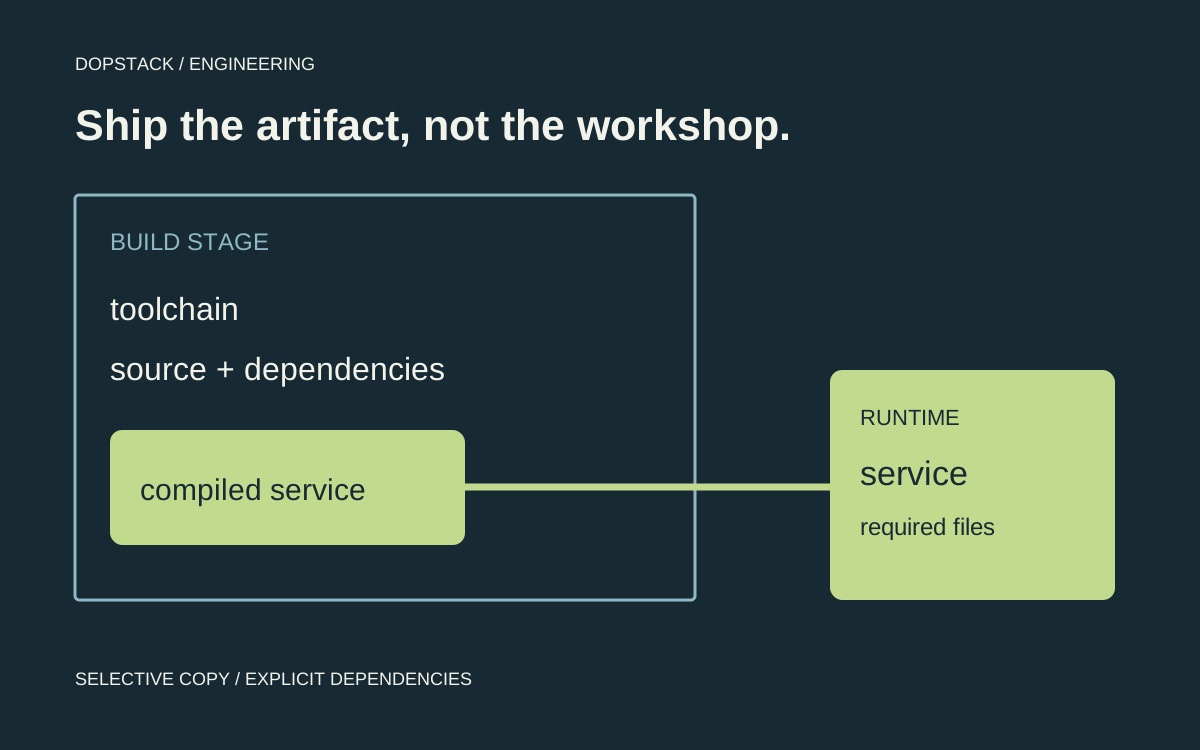
The runtime gets an artifact, not the workshop
Build environment
Go toolchain and module downloads
Compiled output
/out/server
Copy boundary
Only declared runtime files cross
Runtime
Non-root process and its explicit dependencies
There is a useful counterexample to the smallest-image instinct. Suppose the service starts but every HTTPS request fails because no trust store exists. The size reduction is real; the release is broken. A slightly larger, supported runtime image that satisfies the application’s requirements is the better result. Do not solve that failure by disabling certificate validation.
What should remain in the final image?#
Docker supports multiple FROM instructions and selective copying between stages. That can leave compilers and intermediate build artifacts outside the final image. BuildKit also limits work to stages on which the selected target depends. Those mechanics support a clean separation, but the application still defines its runtime requirements. [1]
Start the runtime inventory with the launch command and follows its dependencies. Record required shared libraries, certificates, writable locations, static assets and configuration inputs. Decide which are built artifacts and which belong to deployment. A missing certificate bundle or native library is not a successful size optimization when the service cannot perform its ordinary work.
| Item | Build-stage question | Runtime acceptance |
|---|---|---|
| Compiler and package tooling | Is it needed only to create artifacts? | Exclude it unless runtime use is justified |
| Application artifact | Which build output is authoritative? | Start that exact artifact |
| Native dependencies | Which ABI and libraries does it need? | Exercise the native operation |
| Credentials | How does the build receive them? | No intended secret copied into release output |
| Writable paths | Which identity writes here? | Verify permissions with the runtime identity |
Why did a source edit invalidate dependency work?#
Separate the cache question from the image-size question. Docker’s cache guidance recommends putting less frequently changing work before more frequently changing inputs. Cache mounts and external caches serve different reuse boundaries, and each builder has its own storage. An ephemeral CI worker needs an explicit reuse strategy. [2]
Inspect the first unexpected cache miss and list its actual inputs. Check whether a broad copy operation made application source an input to dependency installation. Then change the boundary so a source-only edit does not unnecessarily invalidate dependency work. Preserve the lockfile and package-manager contract rather than simply skipping installation.
Validate both a warm build and a cold build. The cold build is the check that the release can be reproduced without a convenient old cache. Record what changed between attempts. Do not call a cached build reproducible merely because it is fast, and do not publish a speedup percentage without a controlled measurement.
How can you tell whether the stage split helped?#
Build the named runtime target in a controlled development environment, then run the final artifact with representative configuration. The following commands are an inspection starting point. They do not publish an image, and they do not prove application behavior without a suitable test service and fixtures.
docker build --target runtime -t example-service:review .
docker image inspect example-service:review \
  --format '{{json .Config.User}} {{json .Config.Entrypoint}}'
docker image history --no-trunc example-service:review
# Run the application-specific smoke test against this final image.
# Repeat the build on a clean builder before accepting the release.
Inspecting the image configuration tells you which user and entry point were declared. History helps review instructions and layer choices. Neither establishes that no secret exists anywhere in the artifact. For that question, review how credentials entered the build, what commands could retain them and which outputs were copied. Keep the evidence appropriate to the claim.
Compare source-only and dependency-metadata changes separately when investigating cache behavior. If every source edit reruns the dependency download, find the first invalidated instruction and its inputs. If warm builds pass but a clean build fails, repair the missing input instead of treating the cache as a required repository. These comparisons are more useful than an unexplained percentage from two different machines.
How should private build credentials be supplied?#
Docker documents dedicated secret and SSH mounts rather than build arguments or environment variables for secret delivery. A secret must be passed to the build and consumed in the intended instruction. Review the whole path, including commands that could copy the credential into an output or print it into logs. [3]
A secret mount in the Dockerfile is only the starting point. Check that the required operation succeeds while the secret is available only through the intended mechanism, and the resulting artifacts and logs contain no deliberately retained credential. Use a non-sensitive test credential when rehearsing the workflow. Do not inspect or expose a production token just to demonstrate the technique.
Which tests should the final stage pass?#
- Run the actual startup pathUse the final image and runtime identity. Verify the launch command, working directory and required files instead of testing only the builder stage.
- Exercise an external dependencyTest a representative network or native-library operation in a suitable test environment. A listening process alone does not prove its dependencies are present.
- Rebuild without existing cacheConfirm that the selected target produces the expected artifact on a clean builder, with documented inputs and secret delivery.
- Compare the release contentsInspect which artifacts were copied and why. Remove accidental source trees or tooling only after confirming they are unnecessary at runtime.
Keep debugging convenience separate from the production artifact. Docker can target a specific stage, which provides a useful boundary for development or inspection. Our recommendation is to document that workflow so a lean runtime image does not become an excuse to make production troubleshooting improvised. [1]
Keep an inspection path outside the release image#
A minimal runtime can be inconvenient to inspect interactively. Decide how operators collect the evidence they need before an incident: application logs, diagnostics exposed through approved channels, or a separate debug target in an appropriate environment. Adding a shell to every release just in case is an ownership decision, not a requirement of multi-stage builds.
The acceptance record should identify the final image digest, tested startup command, runtime identity and representative operation. If the service writes a cache, test the actual writable mount with that identity. If it calls a native library, exercise that path. A compiler-stage unit test and a runtime-stage smoke test answer different questions; keep both where the application warrants them.
Multi-stage build questions#
- Does using multiple stages automatically make an image safe?
- No. It controls what is copied into later stages, but your selection can still include unnecessary files or build outputs containing secrets. Inspect the actual release boundary and test the runtime behavior. [1][3]
- Will my local cache automatically exist in CI?
- Do not assume so. Builders have their own cache storage. Choose and verify an appropriate cache export and import strategy for ephemeral workers, then retain a cold-build check so the cache is not hiding missing inputs. [2]
- Can a build use a private package repository?
- Yes, but use the documented secret-delivery mechanism appropriate to the operation and avoid retaining credentials in artifacts or logs. Passing a secret and consuming it are separate steps that both need configuration. [3]
- What should I compare before accepting a smaller image?
- Compare successful startup, required functionality, permissions, dependency availability and clean-build behavior, alongside the size. A smaller artifact is not an improvement if its ordinary runtime operations fail or its recovery workflow becomes unclear.