Docker build secrets: keep tokens out of image layers
A temporary BuildKit mount solves credential transport. A disposable dummy-token probe shows what it does, what cache hides and what your build can still leak.
Quick answer
Docker build secrets should enter through a BuildKit secret mount consumed by a specific instruction. Keep credentials out of ARG, ENV and ordinary build-context files, then inspect what the consuming command writes. Test missing inputs and final artifacts with a dummy marker, and force fresh execution when checking authentication because secret changes alone do not invalidate cache.
On this page
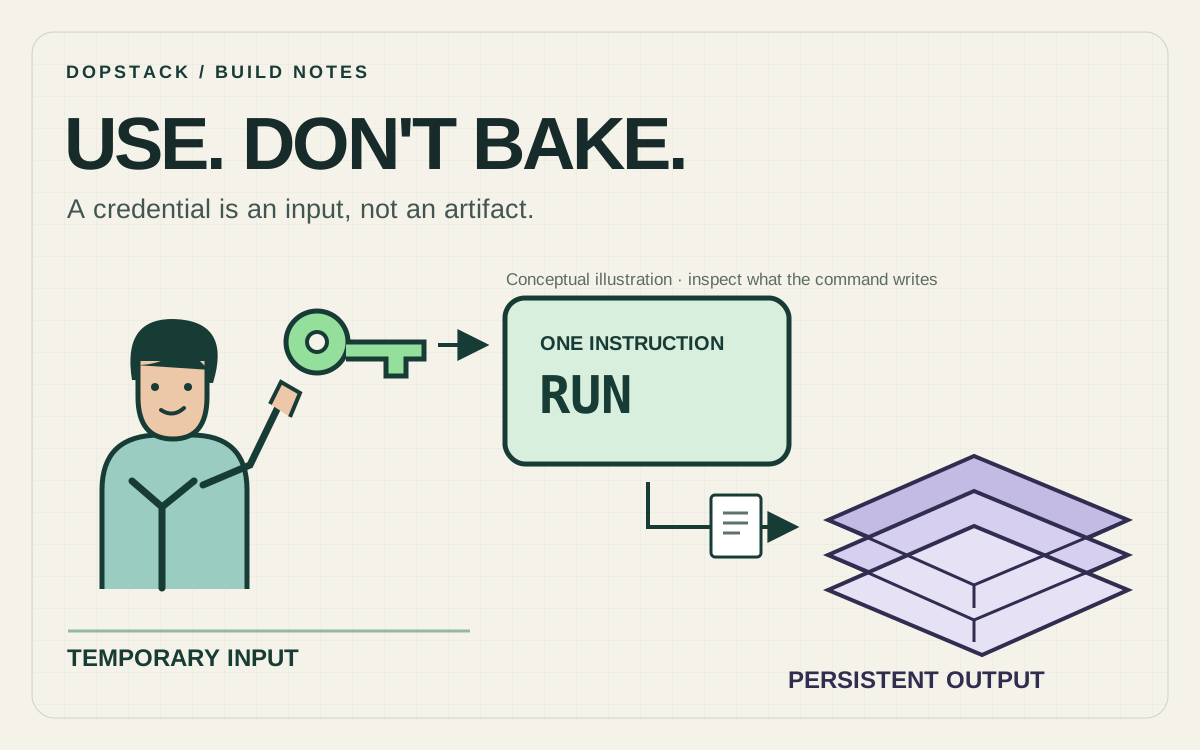
Use a BuildKit secret mount to give a Docker build instruction its credential, then verify what that instruction writes. Passing a token through ARG or ENV is unsafe, and replacing it with a temporary mount does not stop the package client from copying the value into an ordinary file or printing it. Treat credential input, build outputs and authentication as separate checks. [1][2][3]
Scenario: a repository token is needed during the build, but the runtime must not contain it. We will test that boundary using a deliberately fake token and a constant output file before introducing a real package client.
Why are ARG and ENV the wrong credential boundary?#
ARG configures a build; it is not a secret store. Docker documents that build arguments can survive in image metadata, history or provenance. An unused argument does not automatically become a runtime environment variable, so the precise claim is not that every argument appears in every container. The problem is that ARG offers no suitable confidentiality contract. [2]
ENV has a different purpose: it configures the build environment and persists in containers started from the image. A repository token needed only while downloading a dependency should not become part of the application’s runtime configuration. Passing an ARG into ENV makes that mistake explicit rather than fixing it. Keep ordinary version selectors and feature flags separate from credentials. [2]
The same output question applies to a credential copied as a normal file. If an instruction persists sensitive bytes into a layer, hiding that file in a later instruction is not a satisfactory release test. A reader should inspect the produced artifact and retained build surfaces, not just the merged directory visible in a running container. Docker’s image model is immutable: a replacement build does not edit previously distributed content. [6]
A multi-stage build gives you a useful runtime boundary, but it is not a general secret scrubber. The final stage can still copy an accidentally credential-bearing file from the build stage. The broader distinction between build inputs and runtime contents is covered in our multi-stage build guide. Here the question is narrower: which bytes did the credential-consuming instruction leave behind?
Give the dummy credential a narrow contract#
Scenario: the fixture accepts a nonempty repo_token file and writes constant proof that the input was available. It does not test whether a server accepts the token or download an artifact. Each result has that deliberately narrow interpretation.
Keep the dummy file outside the build context. Docker defines the context as the files available to the build, independently of secret mounts. Putting credentials beside the Dockerfile and relying on nobody to add a broad COPY later creates another route into the image. A .dockerignore rule is a useful second control; it does not turn an ordinary context file into an instruction-scoped secret. [5]
Scenario: create a fresh directory for the Dockerfile below. In a separate temporary directory, create a file named dummy-token.txt containing an unmistakably synthetic value such as DOPSTACK_DUMMY_ONLY. Give the build the absolute path to that file. Do not substitute a production token while learning which logs or exported files the exercise produces.
*
!Dockerfile
The small allowlist fits this fixture because it has no application source to copy. For an application, review the source, lockfiles and generated files that actually need to enter the context. Check which context directory the CI command actually selects and whether a Dockerfile-specific ignore file takes precedence; reviewing the repository root alone can miss the effective policy. Docker documents both the context root and the precedence rule. [5]
What does the secret mount actually protect?#
A secret mount makes the input available for the consuming build instruction. Docker’s CLI supplies the secret and the Dockerfile explicitly requests it. In this Linux example the file appears at /run/secrets/repo_token. The mount is not a request to copy that file into the image. The next instruction must request its own mount if it needs the same credential. [1][3]
# syntax=docker/dockerfile:1
FROM alpine:3.22 AS probe
RUN --mount=type=secret,id=repo_token,required=true \
    test -s /run/secrets/repo_token && \
    mkdir /out && \
    printf 'build authorisation checked\n' > /out/proof.txt
RUN test ! -e /run/secrets/repo_token
FROM scratch
COPY --from=probe /out/proof.txt /proof.txt
Scenario: required=true rejects an executing instruction if the named input is unavailable. The following test -s adds a different assertion: an available but empty file is not acceptable to this fixture. Neither check authenticates anything. The command writes only a constant message into /out/proof.txt, so there is no reason for the token’s bytes to enter that output.
Scenario: the subsequent RUN checks that the mount is no longer available. The final scratch stage copies one explicitly named output file. It has no shell or package client to run; that is intentional. We will inspect its filesystem through Docker rather than pretending this probe is a deployable application.
The boundary ends at the program that reads the credential. A shell command can copy the mounted file into /out; a configuration helper can write it elsewhere; a verbose client can print a request containing it. The transport can behave correctly while the command leaks. Review the Dockerfile and the client’s configuration together, including scripts invoked by dependency installation.
Run the probe and inspect the output#
Scenario: run these commands from the fixture directory. Replace /absolute/path/dummy-token.txt with the synthetic file outside that directory. Use a disposable tag and a builder supporting BuildKit secret mounts. Disabling instruction cache makes the first consumer execute.
docker buildx build --load --no-cache --progress=plain \
  --secret id=repo_token,src=/absolute/path/dummy-token.txt \
  -t secret-probe:local .

# A missing input must fail when the instruction executes.
docker buildx build --load --no-cache --progress=plain \
  -t secret-probe:missing .
Scenario: the provided-input build should succeed. The missing-input build should fail at the required mount, before producing the final artifact. Run an additional uncached build with an empty file: that input exists, but the nonempty assertion should fail. Preserve the exit code and the relevant build step for each case; a green CI job that ignored a command failure proves nothing.
Scenario: inspect the successful scratch filesystem without starting it. Supplying a command lets docker create establish a container record. Export its filesystem, inspect the files and remove that disposable container. Keep the rehearsal archive free of real credentials.
probe_container=$(docker create secret-probe:local /proof.txt)
docker export "$probe_container" -o probe-filesystem.tar
docker rm "$probe_container"
tar -tf probe-filesystem.tar
tar -xOf probe-filesystem.tar proof.txt
docker history --no-trunc secret-probe:local
Scenario: the intended build payload is proof.txt with the constant text shown in the Dockerfile. Docker may also add container bookkeeping files such as hosts and resolver configuration to the exported filesystem; classify those separately. The secret file should be absent. Search extracted regular-file contents and image configuration for the exact dummy marker using a local check that reports pass or fail without printing matches. A filename-only listing cannot establish that the marker is absent from another file’s contents.
Scenario: add a negative control in a separate copy of the fixture. Make the consuming instruction copy the dummy input to /out/leaked.txt, and make the final COPY include that directory. The build should still succeed; the output inspection must now fail because it finds the marker. This demonstrates that the checker detects the class of mistake it claims to prevent. Never perform that control with a real credential.
A final filesystem check is deliberately narrow. It cannot establish that build logs, intermediate outputs, remote build infrastructure or a contacted service never received the credential. Review those surfaces separately. Avoid broad history checks that flag the word secret in an instruction name: the important question is whether sensitive values or credential-bearing files crossed a boundary, not whether a developer used a descriptive identifier.
Why can a required-secret build pass without its token?#
A cached instruction does not execute its command again. Docker states that secret contents are not part of the build cache and that changing the value does not itself invalidate the cached result. Therefore a successful cached build is not an authentication check for a newly rotated credential. The requirement applies when the instruction runs, not as a promise that every build invocation performs a fresh login. [4]
Scenario: after the successful probe build, repeat the same build without --no-cache and without --secret. When the builder reuses the cached consumer instruction, the build can succeed without reading a token. Now change only the dummy file’s contents and pass it again. A matching cache result can still be reused. Finally force the stage to execute without the secret; that run must fail.
| Observation | What it establishes | What remains unproved |
|---|---|---|
| Uncached consumer accepts a nonempty dummy file | The supplied mount can be read | Any private service accepts the credential |
| Next instruction cannot read that mount | The mount lifetime ended | The prior command never copied or printed its bytes |
| Final artifact contains only the constant proof payload | The fixture exported its intended output | Other build stages, logs and external systems are clean |
| Cached consumer succeeds without a supplied secret | The prior result was reused | A current credential was presented or validated |
| Forced consumer fails without a secret | Required-input rejection ran | A different CI client uses the same builder and inputs |
For a real rotation check, deliberately execute the credential-consuming stage or validate the credential against its intended service through an approved path. Docker supports --no-cache-filter for a named stage. That is often a more focused experiment than clearing unrelated caches. Keep this diagnostic build on a disposable tag until its output and authentication result have been reviewed. [4]
A changed non-secret cache revision can also force the relevant work to run. Do not put the token itself into a build argument to accomplish that; doing so reintroduces the unsafe input path. The revision identifies your decision to refresh, not the credential’s value. Record which stage actually executed so a later reviewer does not mistake a reused output for a newly authenticated download.
How should a real package client use the input?#
Prefer a client option that reads the mounted file directly, or mount a complete credential configuration at the path the client already expects. Review the client’s documented behavior before adopting an example. A helper called configure or login may persist a new file outside the mount. The final image might look small and still contain that generated configuration.
Keep credential-bearing files out of ordinary COPY instructions, explicit output directories and shared package caches. Decide which dependency lifecycle scripts execute with access to the mount. A short instruction lifetime reduces exposure time, but every program invoked during that instruction can still be within the trust boundary. Reducing the credential’s scope and lifetime complements the mount; it does not replace reviewing those programs.
If the consuming instruction runs as a non-root user, verify the mount’s ownership and mode against that user. Docker’s reference documents mode, uid and gid controls for Linux secret files. An unreadable file and an unavailable secret are different failures. Correct the permissions you intended rather than falling back to ARG because the first attempt produced a permission error. [3]
The repository credential should also be distinct from runtime secrets. A service that needs a credential after deployment requires a runtime delivery mechanism; this build example does not supply one. State the lifecycle in the pipeline configuration so an engineer does not later add ENV simply to make a build-only input appear in production.
Credential access also belongs in the CI permission model. A trusted Dockerfile does not help if an untrusted change can replace the command while retaining the job’s secrets. Our GitHub Actions hardening guide covers that wider execution boundary. Cache investigations have their own evidence requirements, discussed in the cache-miss diagnosis guide.
What evidence is enough to accept the change?#
Accept the change when the consumer obtains its required access and produces reviewed outputs without credential-bearing files or values. A successful build supplies only part of that evidence. Check the actual client, artifact selection, provenance and retained logs.
- Name the consuming command and the reason it needs the credential.
- Show a forced execution that fails when the input is missing or unacceptable.
- Inspect the intended output and verify the checker catches a deliberate dummy leak.
- Check the real client’s generated configuration, logs and retained cache contents.
- Exercise credential rotation through a fresh authentication attempt, separately from a cache hit.
- Record the builder, tested scope and release artifact so the evidence can be repeated.
Scenario: this article’s disposable probe was exercised with Docker Engine 29.1.3 on Linux arm64 through Docker Desktop. Provided, missing, empty and cached input cases were checked; the final filesystem was inspected; and a deliberately copied dummy marker was detected. These are functional checks, not timing benchmarks. No real token, private registry authentication or production pipeline was tested.
If a real credential has already reached a distributed artifact, handle its revocation or rotation through your incident process and identify the affected outputs. Rebuilding changes the artifact you produce next; it cannot establish that older copies were recalled. Keep the remediation decision separate from the proof that the corrected build now uses an instruction-scoped input. [6]
Questions about Docker build secrets#
- Does required=true verify that my token works?
- No. It makes an executing instruction fail when its named secret is unavailable. The consumer must still reject an empty or invalid input and perform its intended authentication. A cached instruction may not run at all, so a green cached build is not a token-validation result. [3][4]
- Can a secret mount still leak into the image?
- Yes. The build command can copy the readable value into an ordinary output file or generate credential-bearing configuration. The mount avoids persisting its own input as an image file; it does not constrain everything the consuming program writes. Review and inspect those outputs explicitly.
- Does changing a build secret invalidate Docker cache?
- Changing the secret value alone does not invalidate the cached instruction. Secret identifiers and mount paths participate in cache decisions, while secret contents do not. Deliberately force the relevant stage to execute when checking a rotation or current authorization. Keep that check separate from ordinary cache reuse. [4]
- Is .dockerignore a replacement for a secret mount?
- No. An ignore file controls ordinary build-context inputs, while a secret mount supplies an input to a selected instruction. Use both where appropriate: prevent credential files from entering the context, then pass the intended credential explicitly through the supported secret mechanism. Review the effective context and ignore-file precedence. [1][5]
- Does a clean final filesystem prove the whole build is safe?
- It proves only the inspected final filesystem meets the checks you performed. Intermediate outputs, image metadata, build logs, package caches and external systems are separate surfaces. Use a dummy marker to test your checker, then review the actual consumer before granting it a real credential.