Hardening GitHub Actions against supply-chain attacks
The tj-actions incident showed what a compromised action can read. Here is how to limit the damage and fix the cause.
Quick answer
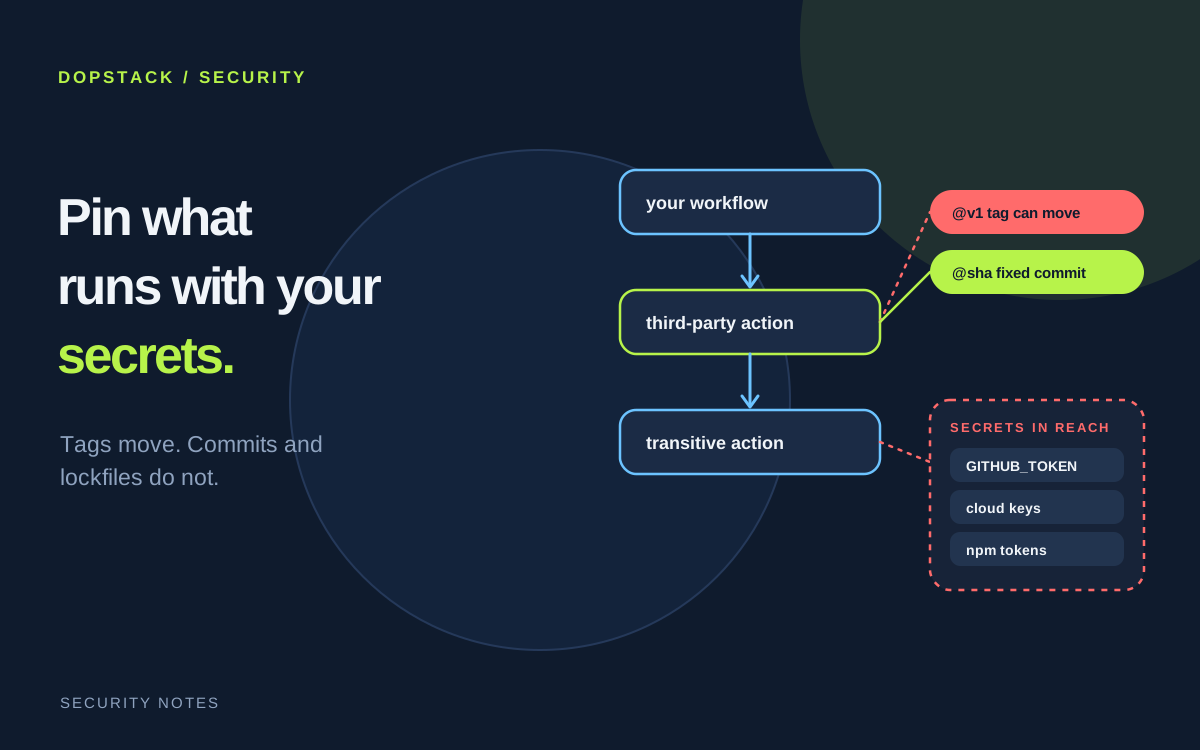
Treat every third-party action as code with access to your secrets. Lock actions to exact commits, preferably with GitHub's workflow dependency lockfile, which also covers transitive actions. Default the GITHUB_TOKEN to read-only, replace stored cloud keys with OpenID Connect, and never check out untrusted pull request code under pull_request_target.
On this page
In March 2025 CISA warned that tj-actions/changed-files, a widely used GitHub Action, had been compromised, exposing secrets that included access keys, personal access tokens, npm tokens and private RSA keys [1]. The lesson is not that one action was bad. A workflow hands every action it runs the secrets and token it can reach [2]. Hardening means shrinking that reach and controlling what actually runs.
What did the tj-actions compromise show?#
CISA's alert says the compromise allowed disclosure of secrets and was patched in v46.0.1 [1]. It was potentially enabled by the compromise of another action, reviewdog/action-setup@v1 (CVE-2025-30154), around the same time, and several other reviewdog actions may also have been affected [1]. CISA added both CVEs to its Known Exploited Vulnerabilities Catalog on March 26, 2025 [1].
Two points matter for your design. An action that depends on another action inherits that action's risk. And GitHub states that a compromised action in a workflow has access to all secrets configured on the repository and may be able to use the GITHUB_TOKEN to write to it [2].
How should you lock third-party actions?#
A tag or branch resolves at run time to whatever commit it points to, and tags can move, so the code that runs may not be the code you reviewed [3]. Pinning to a full-length commit SHA mitigates this, because an attacker would need to produce a SHA-1 collision. Check that the SHA belongs to the action's own repository and not a fork [2].
GitHub now calls a workflow dependency lockfile the strongest protection. It is generated by gh actions-lock into .github/workflows/actions.lock, pins every action including transitive dependencies, and records the numeric owner and repository IDs so Actions can confirm at run time that the repository behind the name is still the one you locked [2][3]. Lockfiles are in public preview and subject to change [3], so trial one on a non-critical repository first.
| Method | Can the code change silently? | Covers transitive actions? | Checks repository identity at run time? |
|---|---|---|---|
| Tag or branch (@v1) | Yes, tags can be moved or deleted | No | No |
| Full commit SHA | No, if the SHA is from the action's own repository | Not by itself | Not by itself |
| Workflow dependency lockfile | No | Yes | Yes, via owner and repository IDs |
What should the GITHUB_TOKEN be allowed to do?#
GitHub recommends making read access to repository contents the default permission for the GITHUB_TOKEN, then raising it for individual jobs only where needed [2].
permissions:
  contents: read          # default for every job

jobs:
  publish:
    permissions:
      contents: read
      packages: write     # only this job can publish
Can you stop storing cloud credentials as secrets?#
If your cloud provider supports OpenID Connect, workflows can authenticate to it directly, so you stop storing long-lived credentials as secrets [2]. GitHub recommends OIDC for deployments because it creates short-lived, well-scoped tokens for each run [2]. For the secrets that remain, review and rotate them on a schedule, and put them in environments with required reviewers so a job cannot read them until someone approves [2].
Which triggers and inputs are dangerous?#
Never place an untrusted value, such as a pull request title, directly in a shell script. GitHub's preferred approach is to set the value of the expression to an intermediate environment variable, or to pass it as an argument to an action [2].
- name: Check title
  env:
    TITLE: ${{ github.event.pull_request.title }}
  run: echo "$TITLE"
The pull_request_target and workflow_run triggers run in a privileged context. Combined with a checkout of an untrusted pull request they expose the repository to compromise [2]. GitHub advises avoiding pull_request_target unless it is necessary, and never explicitly checking out untrusted code in workflows that use either trigger [2].
How do you keep pinned actions current and visible?#
- Dependabot version updates open pull requests when an action releases a new version. If the SHA is followed by a comment with the tag on the same line, Dependabot updates the comment too [2].
- Dependabot alerts have a gap. They are only created for vulnerable actions that use semantic versioning, not for actions pinned to a SHA [2]. Pinning buys stability and costs you those alerts, so watch advisories for pinned actions another way.
- CODEOWNERS on
.github/workflowsrequires a named reviewer for any change to a workflow file [2]. - The Scorecards action automatically flags risky supply chain practices [2].
What should the rollout look like?#
Our order of work, cheapest and highest impact first:
- InventoryList every
uses:line across your repositories, including reusable workflows and what they pull in. - Cut the tokenSet the default GITHUB_TOKEN permission to read-only and add write scopes per job.
- Lock the codeAdopt a lockfile where you can. Otherwise pin third-party actions to full SHAs with a version comment.
- Remove stored cloud keysMove deployment credentials to OpenID Connect.
- Fix the triggersAudit
pull_request_targetandworkflow_runworkflows, and move untrusted values into environment variables. - Automate reviewTurn on Dependabot version updates for actions and CODEOWNERS for workflow files.
- Rehearse the bad dayPick a popular action you use and walk through CISA's steps: identify affected repositories, identify exposed secrets, rotate them immediately [1]. If you cannot list the secrets a workflow can reach, fix that first.
Frequently asked questions#
- Is pinning a GitHub Action to a tag safe?
- Only if you trust its creator, and even then some risk remains. GitHub notes that a tag can be moved or deleted if someone gains access to the action's repository. A full-length commit SHA or a workflow dependency lockfile removes that risk.
- What is a workflow dependency lockfile?
- A file at .github/workflows/actions.lock, generated by gh actions-lock, that pins every action and reusable workflow your workflows use to a verified commit, including transitive dependencies. It is in public preview and subject to change.
- Does pinning to a SHA stop Dependabot alerts?
- For alerts, yes. Dependabot only creates alerts for vulnerable actions that use semantic versioning, not for actions pinned to SHA values. Dependabot version updates still work on pinned actions and can keep a version comment beside the SHA up to date.
- What should the default GITHUB_TOKEN permission be?
- Read access to repository contents only. GitHub recommends this as the default and says to raise permissions for individual jobs that need more, so a compromised action cannot write to the repository by default.
- What should I do if an action I use is compromised?
- Follow CISA's steps from the tj-actions alert: identify affected repositories, identify exposed secrets, rotate every exposed secret immediately, and update to a patched version. Treat any secret the workflow could read as compromised.