Kubernetes Insufficient cpu: prove one Pod fits
Follow an unscheduled Pod from its event to a per-node CPU budget, then choose a change that preserves the workload contract.
Quick answer
Kubernetes reports Insufficient cpu when an eligible node cannot satisfy a Pod’s effective CPU request alongside existing requests. Check node assignment and scheduler events first. Compare requests with allocatable capacity per node, then verify placement constraints. Idle CPU and spare capacity spread across several nodes do not establish that one Pod can fit.
On this page
A Kubernetes Pod can report Insufficient cpu while every CPU dashboard looks quiet because scheduling uses resource requests and per-node capacity, not spare CPU averaged across the cluster. Confirm that the Pod is unscheduled, identify the nodes it is allowed to use, then check whether its effective request fits on any one of them. A larger cluster total cannot rescue a Pod that fits nowhere. [1][2][3]
Is the Pod actually waiting for the scheduler?#
Check node assignment and scheduling conditions before changing CPU settings. Pending is a phase, not a diagnosis: the official lifecycle description includes waiting for scheduling and downloading images. A Pod that already has a node name may need a completely different investigation. An event containing FailedScheduling and Insufficient cpu, together with an unscheduled Pod, is the branch this article follows. Preserve the event text and its timestamp so an old failure does not become the explanation for a new state. [2][5]
NS=your-namespace
POD=your-pod
NODE=your-candidate-node
# Replace namespace and pod with your own values; these commands only read.
kubectl get pod "$POD" -n "$NS" -o wide
kubectl get pod "$POD" -n "$NS" -o jsonpath='{.spec.nodeName}{"\n"}{range .status.conditions[*]}{.type}{" "}{.status}{" "}{.reason}{"\n"}{end}'
kubectl describe pod "$POD" -n "$NS"
kubectl get events -n "$NS" \
  --field-selector involvedObject.name="$POD" --sort-by=.lastTimestamp
Read the complete scheduler message. Different groups of nodes can fail for different reasons: some lack CPU, others reject the Pod through a taint, and others fail its affinity rules. Those counts do not promise that removing any single constraint will produce a usable node. Record which nodes remain candidates after the full constraint set, rather than treating every node in the cluster as available capacity. This avoids spending an incident tuning a pool that the workload cannot enter. [3][4][5]
If the Pod is already assigned, follow the evidence into the container lifecycle. A registry problem belongs in the ImagePullBackOff investigation. A workload waiting on storage needs the Pending PVC investigation. Neither is fixed by a CPU fit calculation. Keep the scheduler event as historical evidence, but use current conditions to select the next diagnostic step.
What does a CPU request reserve in this decision?#
The request is the CPU amount the scheduler accounts for when deciding placement. Node allocatable capacity is the starting budget; already scheduled workload requests consume that budget. Live usage answers how busy the CPUs currently are, which is useful for right-sizing, but it is a different question from whether Kubernetes can promise another workload its requested resources. The resource-management documentation explicitly describes refusing placement when its capacity check fails even with low actual usage. [1]
A limit governs runtime consumption. It is not an interchangeable scheduling knob. Raising a CPU limit does not create allocatable capacity, and lowering a limit does not necessarily lower the request that the scheduler sees. Inspect the admitted Pod object rather than assuming the deployment template is the final specification. Defaults and admission changes can make the effective object differ from the YAML under review. Read the request and limit as separate fields, then connect each field to the part of the system that uses it. [1]
NS=your-namespace
POD=your-pod
NODE=your-candidate-node
kubectl get pod "$POD" -n "$NS" -o yaml
kubectl describe node "$NODE"
kubectl get node "$NODE" \
  -o jsonpath='{.status.allocatable.cpu}{"\n"}'
kubectl get limitrange,resourcequota -n "$NS"
kubectl get nodes --show-labels
Use the node description to inspect allocated requests alongside allocatable CPU. Do not subtract a cluster-wide utilization percentage from the node hardware specification. System reservations, existing Pods and DaemonSets all affect what a new Pod can receive. Also inspect the request calculation appropriate to the Pod: ordinary containers, init containers, restartable sidecars, Pod overhead and supported Pod-level resource settings can change the effective value. The miniature model below deliberately accepts an already determined CPU request; it does not reproduce every scheduler accounting rule. [1]
A worked case: enough CPU in total, nowhere to put it#
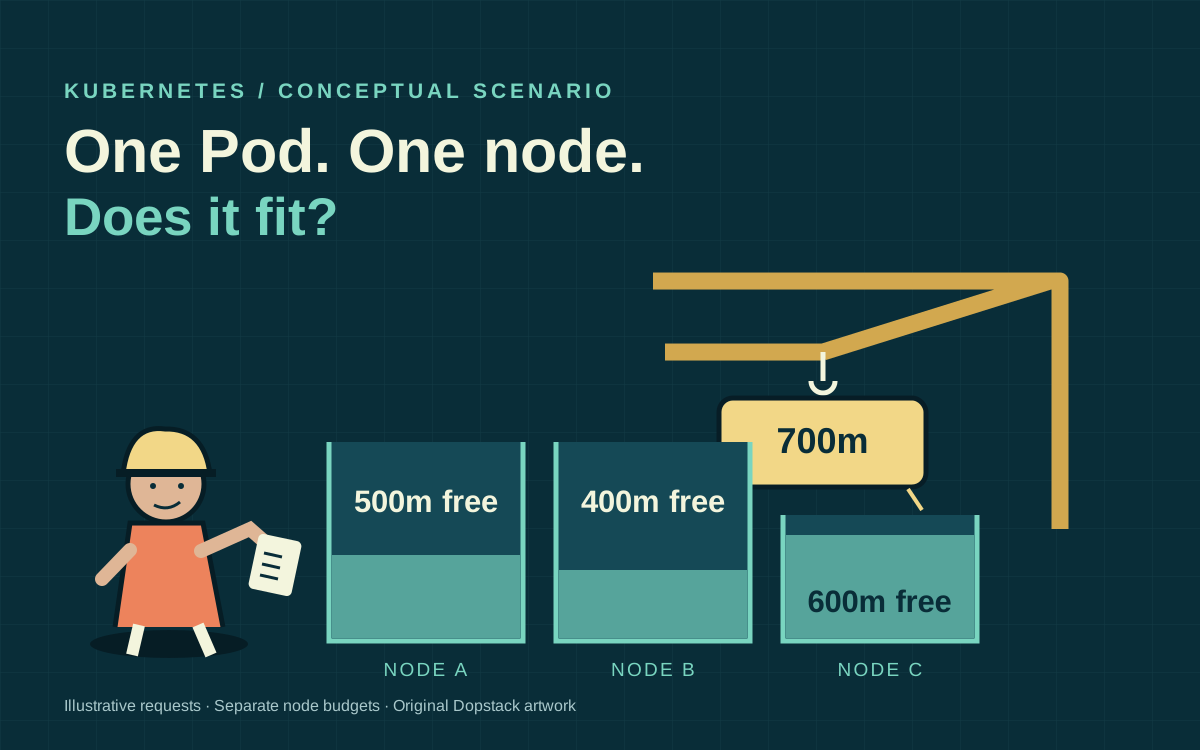
Scenario: an application Pod requests 700 millicpu, written 700m, and is eligible for three nodes. Each node exposes 2,000 millicpu of allocatable capacity. Existing requests consume 1,500, 1,600 and 1,400 millicpu respectively, leaving 500, 400 and 600. The remaining total is 1,500, which sounds ample until the placement question is asked per node. The new Pod needs one node with 700 available; none has it. These are illustrative inputs, not measurements from a Dopstack cluster.
| Eligible node | Allocatable | Existing requests | Unrequested | Fits new 700m Pod? |
|---|---|---|---|---|
| node-a | 2000m | 1500m | 500m | No |
| node-b | 2000m | 1600m | 400m | No |
| node-c | 2000m | 1400m | 600m | No |
Scenario: the dashboard reports mostly idle processors because the existing workloads are between bursts. That observation can motivate a later measurement exercise, but it does not make their declared requests disappear. Another equally quiet node of the same size can help only if it is eligible and has enough allocatable CPU after its own system and DaemonSet commitments. Adding another unsuitable node increases the cluster total while leaving the failed placement unchanged.
Scenario: the rollout also requires the new Pod to use the same node group as an older replica. Terminating that replica might release enough requested CPU, but doing so spends availability. The decision is now a rollout trade-off, not a mysterious scheduling delay. Record the minimum healthy replica requirement and the permitted overlap before changing rollout settings. A fit obtained by taking the service below its availability requirement does not count as a successful fix.
Can a small model disprove the proposed fix?#
Yes. A model can reject an arithmetic mistake before you change the cluster, provided its assumptions are explicit. This one checks CPU fit for a set of already eligible nodes. It assumes ordinary request accounting has already produced the supplied totals and ignores other resources and placement constraints. A passing result is only a candidate for a real scheduler decision. A failing result proves the proposed CPU budget is insufficient under those inputs.
from dataclasses import dataclass

@dataclass(frozen=True)
class Node:
    name: str
    allocatable_m: int
    requested_m: int
    eligible: bool = True

def fitting_nodes(nodes, pod_m):
    if pod_m <= 0:
        raise ValueError("this model requires a positive CPU request")
    return [n.name for n in nodes
            if n.eligible and n.allocatable_m - n.requested_m >= pod_m]

nodes = [Node("a", 2000, 1500), Node("b", 2000, 1600),
         Node("c", 2000, 1400)]
assert sum(n.allocatable_m - n.requested_m for n in nodes) == 1500
assert fitting_nodes(nodes, 700) == []
assert fitting_nodes(nodes + [Node("d", 2000, 300)], 700) == ["d"]
assert fitting_nodes(nodes + [Node("d", 2000, 300, False)], 700) == []
assert fitting_nodes([Node("exact", 2000, 1300)], 700) == ["exact"]
assert fitting_nodes([Node("over", 2000, 1301)], 700) == []
print("PASS: aggregate, added-node, eligibility and boundary cases")
Scenario: the first assertion rejects the aggregate-capacity argument. The next pair separates adding usable capacity from adding a node excluded by placement rules. The boundary assertions catch a common reporting shortcut: rounding away a small difference that still matters to a fit calculation. The model is intentionally narrower than a scheduler simulator, making its conclusions easy to review and its omissions visible. Run it with Python, then compare its inputs against the admitted Pod and node data.
Use the output as a decision aid, not evidence that your cluster has passed a load test. The local fixture can demonstrate arithmetic and eligibility logic. It cannot validate a cloud quota, an autoscaler configuration, a workload performance requirement or a live scheduling plugin. Keeping that boundary explicit lets a reviewer accept the useful check without being asked to trust an unperformed rehearsal.
Which change addresses the failing constraint?#
Choose a change that creates a suitable node or changes a justified request. Judge the change by the workload requirement it preserves, as well as its infrastructure cost. A smaller request can place the Pod while increasing contention during a burst. A larger node can preserve the workload contract while leaving unused capacity. Adjusting affinity can improve placement while moving traffic across zones or violating an intended isolation boundary. Write down which requirement is negotiable before testing the change. [1][3][4]
| Candidate change | Evidence required | Reason to reject it |
|---|---|---|
| Lower the request | Representative workload measurements and a latency/error acceptance threshold | Only justified by an idle dashboard snapshot |
| Add eligible capacity | A node shape with sufficient allocatable capacity and compatible constraints | New nodes still cannot fit the Pod |
| Change placement rules | The original isolation/topology requirement is explicitly reviewed | Moves the Pod outside an approved boundary |
| Reduce rollout overlap | Availability remains acceptable while capacity is released | Requires removing needed healthy replicas |
| Raise a CPU limit | A separate runtime throttling problem is demonstrated | Does not solve the request fit failure |
A limit change can belong in the same incident if the workload is also throttled after it starts. Keep those findings separate. Otherwise the rollout may succeed because another Pod left the node while an unrelated limit edit receives the credit. Record the before-and-after request totals and the scheduling event sequence so the claimed cause can survive review. Keep the request totals with the incident record so another engineer can reproduce the explanation.
Why might autoscaling add nothing useful?#
An autoscaler needs a possible node configuration that satisfies the pending Pod. It considers requests and scheduling constraints; it does not simply turn an idle-CPU chart into a new machine. First ask whether any allowed node group can produce a node that fits the effective request with its required overhead. Then inspect the relevant autoscaler events and logs for provisioning restrictions. A maximum group size, unavailable capacity or incompatible labels can require a different response from lowering a request. [6]
Scenario: the operator adds capacity to a general-purpose group, but the Pod selects a dedicated group. The new machine is healthy and still irrelevant. In the fit model this is the added node whose eligibility flag is false. In a real cluster you must derive that exclusion from selectors, required affinity, taints and other applicable constraints. A toleration removes one reason for rejection; it does not force Kubernetes to choose the node or override every other rule. [3][4]
Scenario: the permitted node shape is itself too small once system and DaemonSet requests are counted. Repeating the same provisioning attempt cannot create a fit. Change the available shape or revisit the workload contract with measurements. If no allowed node shape can fit, waiting will not change the declared inputs. Set a bounded investigation window and preserve the evidence that distinguishes slow provisioning from an impossible specification.
How do you verify the fix without stopping at Running?#
Verify both scheduling and the application outcome. Observe that the intended revision binds to an eligible node, then confirm readiness, error behavior and representative request latency. Check that the rollout did not evict capacity needed by a different workload. Placement is a necessary intermediate result, not proof that the request remains appropriate under production load. Keep a rollback route for the configuration or node-pool change, including the criteria that would trigger it.
- Before the change: save the admitted Pod, full scheduler event, candidate-node allocatable values and allocated requests.
- During the change: track the intended rollout revision, placement constraints and any autoscaler decisions.
- After placement: verify readiness and the workload acceptance thresholds agreed before the edit.
- Across the rollout: include overlapping replicas and the required DaemonSets in the capacity record.
- At review: separate locally tested arithmetic from cluster behavior actually observed.
If the Pod fits and starts but does not serve traffic, use the Service endpoint investigation to follow selectors and readiness. A CPU fix should not become a catch-all explanation for a networking failure that follows it. Preserve each successful check so the investigation moves forward instead of cycling back through the same settings.
Questions from the rollout review#
- Why is a Pod Pending when the cluster CPU is mostly idle?
- Pending can cover several lifecycle stages. If the Pod is unscheduled and its event says Insufficient cpu, compare effective requests with remaining allocatable CPU on eligible nodes. Idle usage does not cancel existing requests, and enough capacity in total does not establish a per-node fit. [1][2]
- Will raising the CPU limit fix Insufficient cpu?
- A CPU limit controls runtime consumption; the scheduler uses resource requests for placement. Read the admitted request before editing a limit. If the workload also suffers runtime throttling, investigate that separately and verify it after the Pod is successfully scheduled. [1]
- Should I reduce the request until the Pod starts?
- Reduce a request only when representative workload measurements justify the new contract. Placement alone does not establish acceptable latency or contention under load. If the existing request is justified, create eligible capacity or review rollout and placement constraints instead of forcing the Pod onto an unsuitable node.
- Does a matching toleration guarantee that a node will work?
- No. A toleration addresses a matching taint, while other scheduling requirements still apply. Node selectors, affinity, resource capacity and other constraints can continue to exclude that node. Build the candidate set from the complete scheduling requirements before checking its CPU budget. [3][4]
- Does the Python example reproduce the Kubernetes scheduler?
- No. It checks a narrow CPU budget using supplied effective totals and an eligibility flag. It omits other resources, admission behavior, init-container and sidecar accounting, topology and scheduling plugins. Its purpose is to expose an arithmetic error before a real cluster rehearsal.