Kubernetes PVC Pending: find the blocked handoff
A claim can be waiting correctly, waiting on the scheduler, or failing to provision. Its phase alone cannot choose the repair.
Quick answer
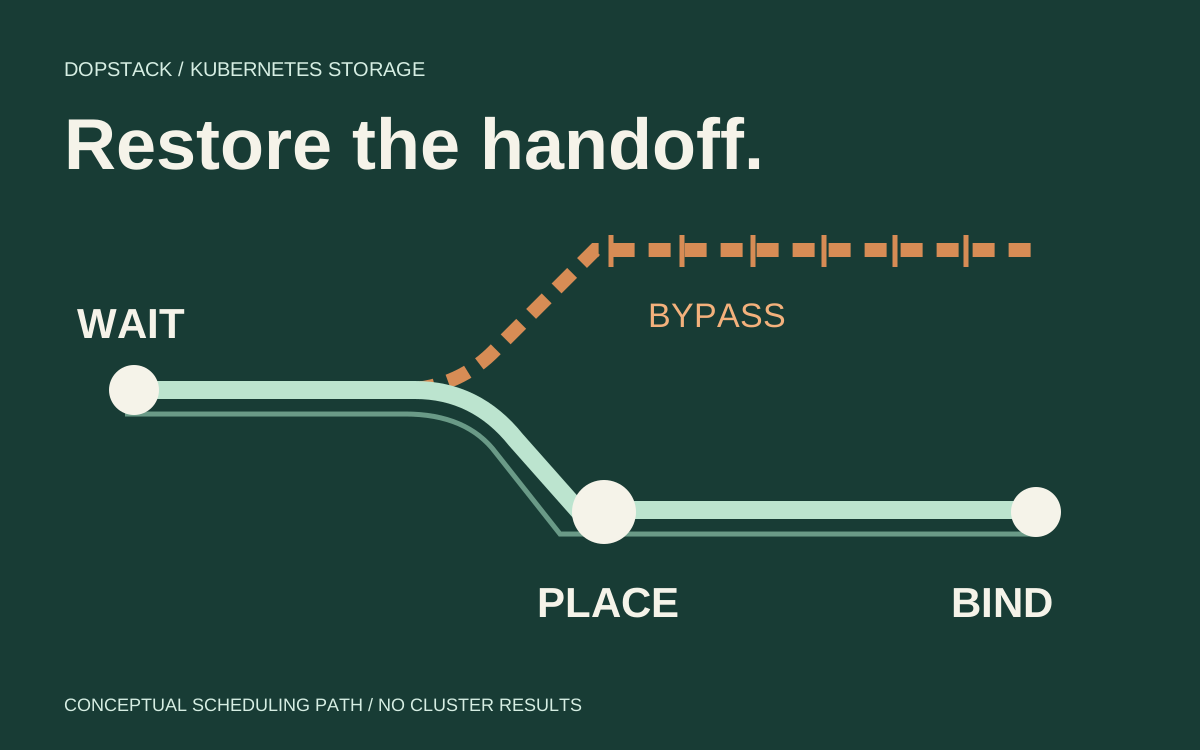
For a Kubernetes PVC stuck Pending, inspect the claim, its consuming Pod and its StorageClass together. WaitForFirstConsumer may be an expected delay, but a Pod that sets nodeName can bypass the scheduler needed for binding. Follow events to distinguish placement constraints from provisioner failures, and preserve existing storage while repairing the owning configuration.
On this page
A Kubernetes PVC stuck Pending needs a handoff diagnosis, not an immediate delete-and-recreate operation. Read its StorageClass, the consuming Pod and both sets of events. Delayed binding can be intentional; direct node assignment can prevent the scheduler from participating; a provisioner can also fail after a placement decision. Those cases need different repairs. [1][2][3]
What is the claim waiting for?#
A PersistentVolumeClaim asks for storage. A PersistentVolume represents storage that can satisfy that request. With dynamic provisioning, the StorageClass identifies a provisioner and its parameters. Pending means the claim has not bound. Read the consumer and class to find the missing handoff. [2][3]
With Immediate binding, allocation happens when the claim is created. With WaitForFirstConsumer, allocation waits for a consumer so placement constraints can inform the volume choice. That matters for storage available only in particular zones or on particular nodes. An unused delayed-binding claim can be behaving exactly as configured. [1]
Scenario: an illustrative report-reader Pod needs a disposable scratch volume. The platform provides a StorageClass named delayed-storage with consumer-aware binding. A developer copies a node name into the Pod spec to place it near a data source. The claim stays Pending even though the developer believes the Pod has already supplied its consumer. We will follow that case through the scheduling boundary.
Capture the Pod, claim and class together#
Begin with object identity and recent events. Kubernetes recommends inspecting the Pod before choosing a branch of the investigation. Use explicit namespaces so a similarly named claim elsewhere does not confuse the record. Read the live claim’s class rather than assuming the current default was applied to it. [2][3][6]
kubectl -n reports get pod report-reader -o yaml
kubectl -n reports describe pod report-reader
kubectl -n reports get pvc report-scratch -o yaml
kubectl -n reports describe pvc report-scratch
kubectl get storageclass delayed-storage -o yaml
kubectl -n reports get events --sort-by=.metadata.creationTimestamp
Record whether the Pod actually references that claim, whether the reference is in the same namespace, and whether the requested class exists. A Pod with a misspelled claim name is not a useful consumer for the real claim. Read storageClassName, requested capacity, access modes and any selector alongside the provisioner identity. These fields define the request being matched. [2][3]
Then inspect volumeBindingMode and the Pod’s placement fields. In the worked case, the class delays binding and the manifest contains nodeName. Kubernetes documents that direct assignment bypasses the scheduler and can leave a delayed-binding PVC pending. An absent scheduler event therefore does not prove the scheduler is healthy or that it accepted this Pod. [1][4]
| Observation | Next inspection | Do not infer |
|---|---|---|
| Delayed binding; no consuming Pod exists | Create or repair the intended consumer [1] | The storage controller is broken |
| Delayed binding; consumer sets nodeName | Source manifest and scheduler participation [1][4] | A named node means volume binding has run |
| Scheduler rejects the consumer | Affinity, node labels, requests, taints and storage topology [1] | Adding storage alone will make the Pod fit |
| ProvisioningFailed event | Named driver error, permissions, capacity and class parameters [1][3] | Every provisioner failure has the same cloud fix |
| Claim is Bound; container cannot mount | Pod events and the mount/attach path [2][6] | Rebinding the claim is the next safe step |
Why can nodeName strand the consumer?#
It bypasses a decision that consumer-aware allocation needs. nodeName directly identifies the node instead of asking the scheduler to choose one. A hostname selector can express a placement constraint while leaving the scheduler in the path. Kubernetes explicitly recommends a selector rather than nodeName for this delayed-binding case. [1][4]
apiVersion: v1
kind: PersistentVolumeClaim
metadata:
  name: report-scratch
  namespace: reports
spec:
  storageClassName: delayed-storage # existing, driver-supported class
  accessModes: [ReadWriteOnce]
  resources:
    requests:
      storage: 1Gi
---
apiVersion: v1
kind: Pod
metadata:
  name: report-reader
  namespace: reports
spec:
  # Do not set nodeName with this delayed-binding case.
  nodeSelector:
    kubernetes.io/hostname: worker-a # actual matching label required
  containers:
    - name: reader
      image: busybox:1.37.0
      command: ["sh", "-c", "sleep 3600"]
      resources:
        requests:
          cpu: 10m
          memory: 16Mi
        limits:
          memory: 32Mi
      volumeMounts:
        - name: scratch
          mountPath: /scratch
  volumes:
    - name: scratch
      persistentVolumeClaim:
        claimName: report-scratch
Scenario: this manifest is illustrative and has not been applied to a cluster. The namespace and class must already exist, the CSI driver must support delayed provisioning, and worker-a must match a real node label. Review the image against your registry policy and use an approved digest for production. The storage request is an example size, not a capacity recommendation.
If hostname placement was accidental, remove the selector too and let the platform choose a valid node. If it is a real requirement, confirm that the selected node is schedulable and that the storage backend can satisfy that location. Replacing direct assignment with an impossible selector preserves a different blocker; it does not complete the repair. [1][4]
Edit the owning manifest or workload template. An existing Pod cannot be treated as freely mutable placement configuration. For this standalone scratch Pod, replacement is the expected workflow after checking that no needed application state is lost. For a controller-managed workload, change its template through the established rollout process and preserve its claim identities. Do not replace a stateful controller’s claims merely to imitate the scratch example. [2][4]
What if binding still does not complete?#
After changing the manifest, read the new Pod and claim events. A scheduler rejection now points to placement. A provisioner rejection points to the driver and backend request. The two can occur sequentially: restoring scheduler participation may reveal a cloud permission or capacity error that was previously unreachable. Record the newly reached driver error as the next blocker. [1][3]
Quota errors need their own branch. A Kubernetes ResourceQuota constrains namespace resource creation and updates; violating it can reject the request at admission. A rejected claim is different from an existing Pending claim. Read the client or controller’s creation error as well as the objects that exist. Changing a quota does not retroactively change resources already created. [5]
kubectl -n reports describe resourcequota
kubectl get nodes -L kubernetes.io/hostname,topology.kubernetes.io/zone
kubectl -n reports describe pod report-reader
kubectl -n reports describe pvc report-scratch
For a static volume, compare requested class, capacity, access mode, selector and any volume reservation with available PersistentVolumes. For dynamic provisioning, inspect the provisioner named by the class and the specific driver error. A storage class named fast does not itself establish that a healthy controller, suitable capacity or required provider permissions exist. [2][3]
Do not manually add a guessed selected-node annotation to force progress. In this case the missing scheduling handoff is the diagnosis; manufacturing a controller-owned observation skips the decision you need to validate. If driver documentation requires a different recovery procedure, follow that documented procedure with the storage owner and record why it applies.
How do you prove the handoff worked?#
Require both binding and usable storage. A Bound claim establishes its volume relationship, but a Pod can still fail later during attachment or mounting. Capture the bound volume identity, Pod placement and fresh events, then verify a read/write round trip inside the intended mount. [2][6]
kubectl -n reports get pvc report-scratch -o wide
kubectl -n reports get pod report-reader -o wide
kubectl -n reports describe pod report-reader
# Only for the disposable scratch volume in this example:
kubectl -n reports exec report-reader -- sh -c \
  'printf "%s\n" binding-check > /scratch/binding-check && cat /scratch/binding-check'
Scenario: expected readback is binding-check. That is an acceptance criterion, not output from a test run. On a real application volume, use the application’s approved health or data-integrity check instead of writing a marker into arbitrary storage. Capture placement and I/O evidence after the replacement, not just from a Pod that was already running.
The repair is complete when the owning configuration describes the intended placement, the claim binds to the expected volume, the consumer mounts it and the workload performs its required operation. If it reaches image startup and then fails, move to the image-pull diagnosis. A later container restart belongs to the startup-probe investigation. Those paths require their own evidence.
Questions at the binding boundary#
- Is every Pending PVC a failure?
- No. A delayed-binding claim may wait correctly until a consumer exists and scheduling constraints are known. Inspect its StorageClass and consuming Pod before deciding that the storage controller has failed or that capacity must be added. [1][3]
- Does nodeSelector solve every delayed-binding problem?
- No. It leaves the scheduler involved, but the selected node must still satisfy compute, taint, affinity and storage constraints. Use a selector only when placement is required, and inspect the new scheduler or provisioner events after the change. [1][4]
- Should I delete the claim and try again?
- Only after understanding ownership, binding and the backing storage lifecycle. For supported plugins, Delete reclamation can remove the storage asset. A disposable scratch example does not authorize the same operation on a database volume or a controller-owned claim. [2]
- Can I switch the StorageClass to Immediate?
- Treat that as a storage-design decision. Immediate allocation can choose storage without knowledge of the consumer’s placement requirements. It may suit some backends, but it is not a general repair for a scheduler bypass in a topology-constrained deployment. [1]