Git revert merge: verify the tree before reintroduction
Choose the mainline from actual parents, then carry an unrelated mainline change through rollback and reintroduction; inspect final file content as well as ancestry.
Quick answer
To revert a Git merge, identify the actual parent you intend to retain, then review the inverse change relative to that parent. The revert creates another commit; it does not remove the original merge from history. Before reintroducing the feature, decide whether you are continuing the same branch or replacing its implementation. Verify the final files as well as the commit graph.
On this page
To revert a Git merge, identify the actual parent you intend to retain, then review the inverse change relative to that parent. The revert creates another commit; it does not remove the original merge from history. Before reintroducing the feature, decide whether you are continuing the same branch or replacing its implementation. Verify the final files as well as the commit graph. [1][2][6]
What does reverting a merge preserve?#
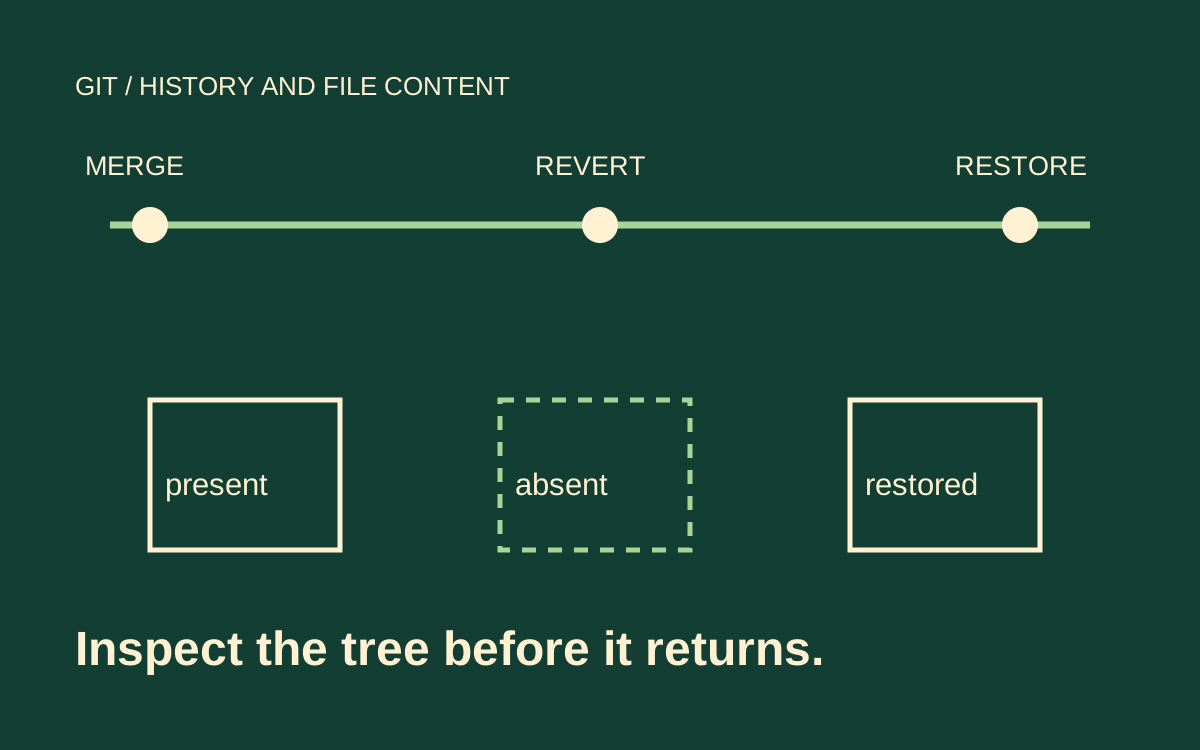
It preserves the history while recording a change to the tree. That distinction explains the familiar surprise: merging the same topic again can report that it is already integrated, even though its files disappeared after the revert. The merge commit remains an ancestor. Reverting its data changes does not make its original topic commits new work. [1][2][3]
Scenario: an illustrative pricing feature adds pricing-rules.txt. While the feature is under development, main also changes support.txt. The team merges the feature, finds a business-rule defect, and wants to remove the feature while preserving the support change. Later the feature branch adds a correction. The recovery must keep unrelated mainline work throughout both operations.
Use this small case to reason about your own repository. The article's symbolic commit names are placeholders, not commands already executed against your project. The sequence assumes a real two-parent merge. A squash merge or a rebased series has a different history and must be inspected as such before applying merge-specific advice.
The desired rollback is not necessarily the entire tree from before the incident. Main may contain valid work added before or after the feature merge. Resetting or replacing the branch with an older snapshot can discard that work. A reverse patch relative to the chosen parent gives you a narrower operation to inspect, but conflicts and later edits still require review. [1][3]
How do you choose the mainline parent?#
Inspect the merge's parents rather than inferring their numbering from branch names. Git's -m option selects the parent relative to which the merge change is reversed. In a conventional merge performed while main was checked out, parent one is normally that pre-merge main tip. Read the parent order from the commit object. [1][5]
# Replace MERGE_COMMIT with the reviewed merge identifier.
git show --no-patch --format='%H%n%P%n%s' MERGE_COMMIT
git log --graph --oneline --decorate -12 MERGE_COMMIT
git diff MERGE_COMMIT^1 MERGE_COMMIT --
git diff MERGE_COMMIT^2 MERGE_COMMIT --
Read both differences when the parent relationship is unfamiliar. The first compares the merge tree with parent one; the second compares it with parent two. They answer different questions. The feature's pull-request diff may not include manual conflict resolutions made during the merge, whereas the merge tree records the actual combined result. [3][4]
For the illustrative case, confirm that the chosen mainline side already contains the support change. Then inspect the merge-relative patch that added the pricing rules. Write the decision plainly: retain main's support behavior and remove the feature contribution represented by this merge. That sentence is more reviewable than a ticket saying only to undo the last PR.
Do not treat -m 1 as the branch number to delete. It names the parent used as the baseline for the inverse change. If parent two represents the line you actually need to retain, selecting parent one because it is common can reverse the wrong work. Parent inspection is especially important for unusual integration histories. [1]
What should you inspect before committing the revert?#
Review the candidate tree on a clean, isolated recovery branch. Git revert expects a clean working tree for its ordinary operation. The --no-commit option can prepare a reverse change without immediately recording the result, which gives a reviewer a chance to inspect the proposed patch. Run this only in your intended recovery environment after replacing the symbolic identifier. [1]
# Illustrative review sequence on a clean recovery branch.
git status --short
git revert --no-commit -m 1 MERGE_COMMIT
git diff --cached --stat
git diff --cached -- pricing-rules.txt support.txt
At this point the expected candidate removes the feature contribution and retains the support change. Review the entire staged patch, not only these two teaching files. If the operation conflicts, resolve each file according to the intended rollback behavior. A mechanical choice of one conflict side can preserve a textual patch while losing the service behavior you meant to retain.
If the selected mainline is wrong, stop and return the isolated recovery environment to a known state using your team's normal recovery procedure. Git provides sequencer operations such as abort for an in-progress conflicted revert. An abort command is not a general undo button for every successfully applied no-commit change; inspect state before choosing a recovery operation. [1]
Only after reviewing the patch and tests should your team record and deliver the revert. This article provides a review sequence, not permission to change a shared branch or rewrite history. Keep the operation in the existing review process so the incident record captures the reason and the feature's reintroduction plan.
Why does merging the fixed branch fail to restore the feature?#
Because new commits on the topic are new, while its original merged commits remain ancestors. Suppose the original feature added the pricing-rules file and a later correction adds a separate test file. After the merge revert, merging only that later correction can add the test without restoring the original feature file. The merge can succeed while the pricing-rules file remains absent. [1][2][3]
The distinction is visible in a small history. This is an illustrative graph, with the arrows omitted for readability. M is the original merge, R its revert, and F the later topic fix. Main's unrelated work remains part of the case.
main:   B --- S --- M --- R --- U
         \        /
topic:    A ----- C --- F

S: support change on main
M: merge of the original pricing feature
R: revert of M relative to main's parent
U: unrelated later main change
F: correction added on the existing topic
Inspect which files the new merge would produce in a disposable rehearsal. Do not conclude that the old feature returns because git log displays its commits or because the new fix commit is present. Read the graph to establish ancestry, then inspect the files and run the policy tests.
This is also why a branch containing only a tiny fix may be an unsuitable reintroduction unit. The fix can be correct relative to a feature that is absent from main. The review needs both the intended base feature and its corrections, not merely the latest patch viewed in isolation.
Should you revert the revert or rebuild the feature?#
Continue the existing topic by restoring the reverted contribution first when that contribution is still the intended foundation. Reverting the revert can reintroduce the original tree changes; merging the subsequent topic corrections then brings the feature forward. The Git project's faulty-merge guide explains this case and distinguishes it from a replacement implementation. [2][3]
| Feature development since rollback | Candidate approach | Verification focus |
|---|---|---|
| Original implementation plus corrections | Revert the revert, then integrate corrections | Original feature and fix both present |
| Rebuilt implementation based on current main | Review the replacement branch as new work | No accidental restoration of discarded design |
| Only selected parts should return | Prepare a deliberate replacement change | Explicit included and excluded behavior |
For the first row, identify the actual revert commit rather than assuming it is HEAD. Later mainline work may have accumulated. Reversing the wrong revert can restore unrelated behavior or create a misleading review. The following sequence is illustrative and deliberately leaves the final delivery to your normal process.
# On an isolated reintroduction branch based on current main.
git show --stat REVERT_COMMIT
git revert --no-commit REVERT_COMMIT
git diff --cached --
# After review and recording that restoration through your workflow,
# integrate the existing topic's correction and inspect the final tree.
Do not combine this mechanically with a branch that already rebuilt the feature on current main. That branch may contain the desired full implementation as new changes. Restoring the old design first can duplicate work or introduce conflicts that the replacement was meant to avoid. The deciding question is what the branch actually contains relative to current main. [2]
What if you only want part of the feature back?#
Treat that as a new design decision with explicit acceptance criteria. A full revert-of-revert restores the old contribution as an inverse patch, subject to conflicts. It does not understand which business behavior is now approved. Build a reviewable replacement patch when partial restoration is the goal, and document why the original branch is no longer the release unit.
Avoid making branch topology more complicated merely to force Git to regard old work as new. Recreating commits can be appropriate in an isolated replacement workflow, but it changes the review problem. The team must be able to compare the replacement with the discarded implementation and explain which behavior survived. [2]
What proves the reintroduction is complete?#
Check three things separately: ancestry, file content and behavior. The existing topic's correction should be integrated where intended. The pricing-rules file should exist with the corrected policy. The unrelated support changes from main must still be present. Then run the actual policy tests and any integration checks affected by the rollback.
A final diff against current main is useful for reviewing the proposed release. A direct comparison of selected files with the approved candidate can establish exact expected content. Git diff's two-endpoint form compares trees; do not substitute a merge-base-oriented comparison without understanding how that changes the question. [4]
Record the original merge, chosen parent, rollback commit and reintroduction decision in the review. Include any conflict resolutions whose meaning is not obvious from the patch. Later maintainers should not have to reverse-engineer why the graph contains a merge, its revert and a restoration.
The command sequences here were reviewed against Git's documentation. They are illustrative, and no project commits, merges or shared-branch changes were performed for this article. Rehearse with a disposable repository or an isolated recovery environment before using real identifiers. If CI cannot even establish the comparison base, the shallow-clone diagnosis is the earlier problem to solve. Once the candidate is reviewed, stale deployment guards address a separate release-order risk.
Include a negative acceptance case: a file or behavior intentionally removed by the rollback must stay absent if the replacement design rejects it. Reintroduction should restore approved behavior, not every historical feature merely because it once arrived in the same merge. Record that distinction beside the final diff.
- Does git revert remove a merge from history?
- No. It records another commit reversing a change relative to the selected parent. The original merge remains in ancestry and still affects later integration decisions. Inspect both the graph and the resulting files when planning to restore the feature. [1][2]
- Is parent one always main?
- Do not rely on the name alone. In a conventional merge into main, the first parent normally represents its previous tip, but the commit object records the actual parent order. Inspect that order and both parent-relative differences before choosing the mainline argument. [1][5]
- Will a new fix commit bring the original feature back?
- Not necessarily. The original feature commits can already be ancestors of main despite their changes being reverted. A later merge may bring only subsequent work. Inspect the final tree and decide whether the existing implementation should first be restored or replaced. [1][2]
- Should every merge revert later be reverted again?
- No. That approach fits continued development of the same implementation. A replacement built on current main may already carry the desired complete feature. Choose from the actual branch content and intended behavior, then verify unrelated mainline work survives. [2]