NGINX proxy_pass: verify the upstream path contract
Repair a slash mismatch only after recording the backend request target; add boundary and encoded-identifier cases that a successful health route cannot prove.
Quick answer
An NGINX `proxy_pass` trailing slash changes the URI mapping in an ordinary prefix location. Before adding or removing it, establish the exact path the backend expects and observe the request target it actually receives. A successful health check does not prove resource routes, query strings or encoded identifiers work. Make those cases part of the route contract, then change one mapping rule.
On this page
An NGINX proxy_pass trailing slash changes the URI mapping in an ordinary prefix location. Before adding or removing it, establish the exact path the backend expects and observe the request target it actually receives. A successful health check does not prove resource routes, query strings or encoded identifiers work. Make those cases part of the route contract, then change one mapping rule. [1]
Which path does the backend expect?#
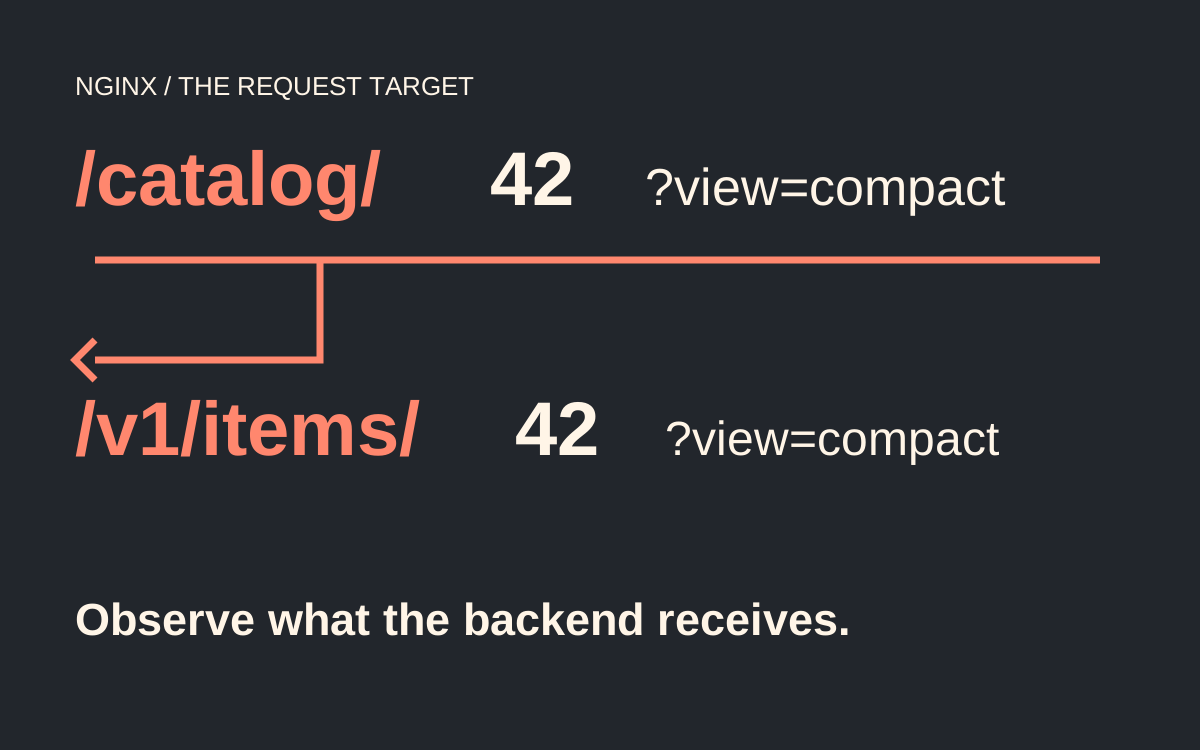
Write the backend route down before editing the proxy. Scenario: an illustrative catalog API exposes /catalog/42?view=compact publicly, while the upstream serves /v1/items/42?view=compact. The proxy must replace one prefix while preserving the resource identifier and query. Sending either the complete public path or just /42 is wrong for this service, even though both configurations look plausible.
Write down the public target, intended upstream target and application response before editing configuration. Include the method and a representative body when the route accepts writes. The proxy must translate the public interface into the route the backend actually serves. The familiar advice to make slashes symmetrical cannot establish which interface your backend implements.
In an ordinary prefix location, a URI in proxy_pass replaces the matching part of the normalized request URI. A server address without a URI follows different forwarding rules. The slash immediately after the upstream address matters because it constitutes a URI, even when the URI is only /. Rewrites, variables and other location forms add separate cases. [1]
For this catalog, the intended mapping is explicit:
# Within an existing server context. catalog_backend is defined below.
location /catalog/ {
    proxy_pass http://catalog_backend/v1/items/;
}
The example is deliberately narrow. It does not include your production TLS settings, authentication policy, buffering, timeout policy or forwarded-header requirements. Keep those existing concerns visible when reviewing a real change. Copying a minimal route example over a complete server block can remove behavior that has nothing to do with the slash problem.
What does each proxy_pass form actually change?#
For the same ordinary prefix location, the three common forms express three different contracts. Treat this table as expected behavior for the simple case described, then verify it with your installed NGINX and upstream. It is not a universal table for regex locations, changed URIs or variable-based routing. [1]
| proxy_pass destination | Public request | Expected upstream target |
|---|---|---|
| http://catalog_backend | /catalog/42?view=compact | /catalog/42?view=compact |
| http://catalog_backend/ | /catalog/42?view=compact | /42?view=compact |
| http://catalog_backend/v1/items/ | /catalog/42?view=compact | /v1/items/42?view=compact |
The third row matches the illustrative application's route. The first preserves a prefix the app does not recognize; the second removes a prefix without adding the app's required one. An upstream 404 in either case is consistent with a healthy backend receiving the wrong target. Do not restart the application merely because a proxy request returned 404. [1][2]
A named upstream is a server group, not a URL-prefix declaration. Define its members separately and attach the path in the location's proxy_pass. Changing which server receives a request and changing which URI it receives are separate decisions. [5]
# Within the existing http context.
upstream catalog_backend {
    server 127.0.0.1:9000;
}
The loopback address is an illustrative single-host arrangement. In a container or orchestrated deployment, 127.0.0.1 means that network namespace, which may not contain the application. Use the deployment's actual upstream address. A connection failure and a wrong-path response need different repairs; confirm connectivity before interpreting application routing evidence.
How do you prove which request reached the application?#
Observe the upstream's request target using an existing request log or a disposable echo service in an isolated environment. Record the target before application routing transforms it. A public response code alone cannot tell you which URI the proxy sent, and the proxy's normalized URI variable is not a universal copy of the outgoing request line. [1][2]
For a local lab, this Python echo handler reports the target received by its HTTP server. It is a diagnostic fixture, not a production API. Bind it to loopback, use synthetic requests and stop it afterward. Do not put real credentials or customer identifiers into the test query string.
from http.server import BaseHTTPRequestHandler, HTTPServer
import json

class EchoTarget(BaseHTTPRequestHandler):
    def do_GET(self):
        body = json.dumps({"target": self.path}).encode("utf-8")
        self.send_response(200)
        self.send_header("Content-Type", "application/json")
        self.send_header("Content-Length", str(len(body)))
        self.end_headers()
        self.wfile.write(body)

HTTPServer(("127.0.0.1", 9000), EchoTarget).serve_forever()
Point an isolated NGINX listener at that fixture and send the catalog request. The expected body includes /v1/items/42?view=compact. Compare the exact target, not just a substring such as 42. The wrong prefix can still contain the correct identifier. Next run the same mapping against the actual application's test instance and verify its known response.
NGINX access logging can help correlate requests, but its context matters. Requests are logged where processing ends, which may differ after an internal redirect. Record the request identifier and final upstream status using your established logging format. Keep query-string privacy requirements intact; adding a verbose diagnostic log to a public endpoint can disclose tokens or user input. [3]
Which boundary cases should you test before a reload?#
Test the boundary without a slash, a normal resource, a query, a missing resource and an encoded identifier. Each case answers a different question. The illustrative contract below intentionally leaves encoded identifiers unresolved until the application owner defines their meaning. A pass on the ordinary numeric ID does not settle that design decision.
# Substitute the isolated proxy listener used in your lab.
curl --path-as-is -i 'http://127.0.0.1:8080/catalog'
curl --path-as-is -i 'http://127.0.0.1:8080/catalog/42'
curl --path-as-is -i 'http://127.0.0.1:8080/catalog/42?view=compact'
curl --path-as-is -i 'http://127.0.0.1:8080/catalog/not-present'
curl --path-as-is -i 'http://127.0.0.1:8080/catalog/a%2Fb'
For /catalog, choose whether your public API should redirect, reject or serve a separate route. Inspect the actual response and its Location value where relevant. NGINX documents special redirect processing for certain slash-terminated prefix locations using upstream directives. Do not assume that accepting /catalog/42 establishes your desired behavior for /catalog. [2]
For an encoded slash, first decide whether the application considers a/b one identifier, two path segments or an invalid value. URI normalization and framework decoding can affect that distinction. Preserve the raw test request where your client allows it, inspect the received target, then check the framework's interpreted route. If there is no agreed contract, hold that route change instead of guessing from one successful response. [1][2]
Query tests should use the actual parameters the endpoint accepts, including repeated keys if the API permits them. The fixture can show which target arrived; only application tests can show what the query means. A body returned by an echo server is evidence about transport, not business correctness.
Why does a healthy status endpoint miss this failure?#
A health endpoint can be routed through another location, served directly by NGINX, or ignore resource identifiers. It proves only the behavior it exercises. For the catalog release, include at least one real route under the changed prefix and one deliberate failure. If the missing resource unexpectedly becomes a successful HTML page, investigate fallback routing rather than celebrating fewer 404s. [1][2]
What if regex locations, rewrites or variables are involved?#
Return to the exact documented branch instead of applying the simple-prefix table. The proxy module documents cases where the replaceable URI prefix cannot be determined, including regex and named locations. It also describes changed-URI behavior after a rewrite and special behavior when variables appear in proxy_pass. [1]
Inspect the effective configuration and identify every rule capable of selecting or modifying this request. NGINX location matching has explicit precedence rules; an exact match terminates the search, while prefix and regex selection follow their own process. A slash repair in a location that never handles the request cannot change the outcome. [2]
Avoid adding a rewrite merely to repair a mapping already expressible with a straightforward prefix replacement. That is our preference for keeping the contract inspectable. A rewrite is appropriate when the transformation genuinely requires it, but then the route fixture must cover the changed-URI branch. Keep the observed upstream target beside the configuration change.
Do not infer equivalence between $request_uri, $uri and the upstream request target. The core module distinguishes the original request URI from the current normalized URI. A configuration using those values should explain which representation the backend needs, especially around encoded characters and internal redirects. [2]
How should you release and verify the repair?#
Save the previous reviewed configuration and run the syntax check against the exact configuration you intend to load. Syntax validation catches an invalid configuration; it does not know whether /v1/items/42 is your application's route. Keep the route fixture as a separate acceptance gate. NGINX's command-line parameters support testing and inspecting configuration. [6]
After the controlled reload, confirm that the new configuration was accepted and exercise the same public requests through the real ingress path. A failed reload can leave the earlier configuration serving traffic. Re-running a browser request without checking reload success can make an otherwise correct edit appear ineffective. [4]
Use a synthetic resource with a stable expected result. Check method, response type, relevant headers, query handling and failure behavior. Where a CDN or another proxy sits in front, preserve a way to distinguish cached responses from requests reaching the changed listener. The acceptance record should identify the layer tested, not just say that a URL worked.
This article's NGINX configurations and expected mappings are documentation-based examples, not a claim that this exact proxy was deployed or benchmarked. Rehearse with the NGINX build and framework used by your service. If you are changing the ingress layer itself, the Gateway API migration guide addresses a broader migration boundary. For a Kubernetes backend with no usable destination, investigate Service endpoints before changing URI rules.
For write endpoints, extend the contract beyond GET before releasing the mapping. Use a non-production resource and confirm that the intended handler receives the method and body exactly once under the application’s test procedure. A successful GET through the echo fixture does not verify request-body handling, authentication or retry behavior. Keep these checks distinct from the path replacement test so their outcomes remain interpretable.
Also check a route that must remain outside the changed prefix. If the repair accidentally broadens a location or changes another location’s selection, the catalog fixture can pass while another endpoint breaks. Choose the unchanged route from the real server configuration, record its expected handler, and compare before and after. The regression boundary is the set of requests affected by the configuration change, not only the URL from the original incident.
When multiple proxy layers are involved, write the expected request target at each hop. A public prefix may already have been stripped before NGINX sees the request. Capture evidence at the receiving layer in a controlled test rather than stripping the same prefix twice because two configuration files both mention it.
- Does every proxy_pass need a trailing slash?
- No. In a simple prefix location, choose whether the upstream should receive the public prefix, a stripped prefix or a replacement prefix. The backend's route defines the correct choice. Regex locations, rewrites and variables require the corresponding documented behavior. [1]
- Does an upstream 404 mean NGINX cannot connect?
- An upstream application can respond with 404 because it received a path it does not serve. Correlate the proxy response with the upstream's request log or an isolated echo fixture. Connection errors and application route failures should not share one assumed repair.
- Can I use the normalized URI as proof of the sent path?
- Use it as one diagnostic input. It describes NGINX's current URI representation, while the outgoing target depends on proxy_pass and any transformations. Observe the receiving server when you need to prove the actual target and query. [1][2]
- Is a successful syntax test enough to reload?
- It establishes configuration validity, not application routing correctness. Add representative route and failure tests in an isolated environment, preserve the previous configuration and verify the controlled reload. Then repeat the meaningful checks through the actual public path. [4][6]