Python duplicate logs: trace handler ownership
The same console line can come from one record taking several paths. Trace those paths before changing propagation or deleting handlers.
Quick answer
Start a Python duplicate-log investigation by identifying the event and the output destination. Multiple handlers, repeated setup and separate processes can all produce similar lines. Trace the route from the named logger to its ancestors before changing propagation. Then give each output destination an explicit owner and test repeated initialization.
On this page
Start a Python duplicate-log investigation by identifying the event and the output destination. Multiple handlers, repeated setup and separate processes can all produce similar lines. Trace the route from the named logger to its ancestors before changing propagation. Then give each output destination an explicit owner and test repeated initialization. [1]
Are you seeing one event twice or two events once?#
First determine whether the duplication happens inside Python or after the process writes its output. Identical text alone cannot distinguish those cases. A worker can execute an operation again, a record can reach multiple handlers, and a collector can ingest the same stream through separate inputs. Those failures need different repairs.
Scenario: an illustrative billing worker writes an invoice_ready message. A monitoring search shows repeated lines. The worker imports a helper that installs a console handler on billing.worker, while its entry point configures the root logger. A startup hook also runs the helper again. Nothing here establishes that the invoice was generated again.
For this investigation, attach a unique diagnostic event identifier at the call site and include the process identifier, logger name and deployment identity in the format. Use synthetic identifiers while reproducing the issue. Do not add invoice bodies or customer details just to make log lines distinguishable. The formatter can display process, name and other attributes from the record. [1]
Compare raw process output with the collector result. If the raw stream already contains repeated copies of the same diagnostic event, inspect the Python routing graph. If it contains a single copy but the collector shows several, inspect collectors, agents and stream subscriptions. If identifiers differ, the application probably emitted separate events. Check the retry or startup path before removing any handler.
Locate the first boundary where the event count changes. Dropping duplicates at ingestion may reduce visible noise while leaving an accidental repeated operation untouched. Conversely, changing logging configuration cannot repair a collector that reads both a container stream and a forwarded copy. Preserve enough evidence to locate the first boundary where the count changes.
How does a record reach multiple handlers?#
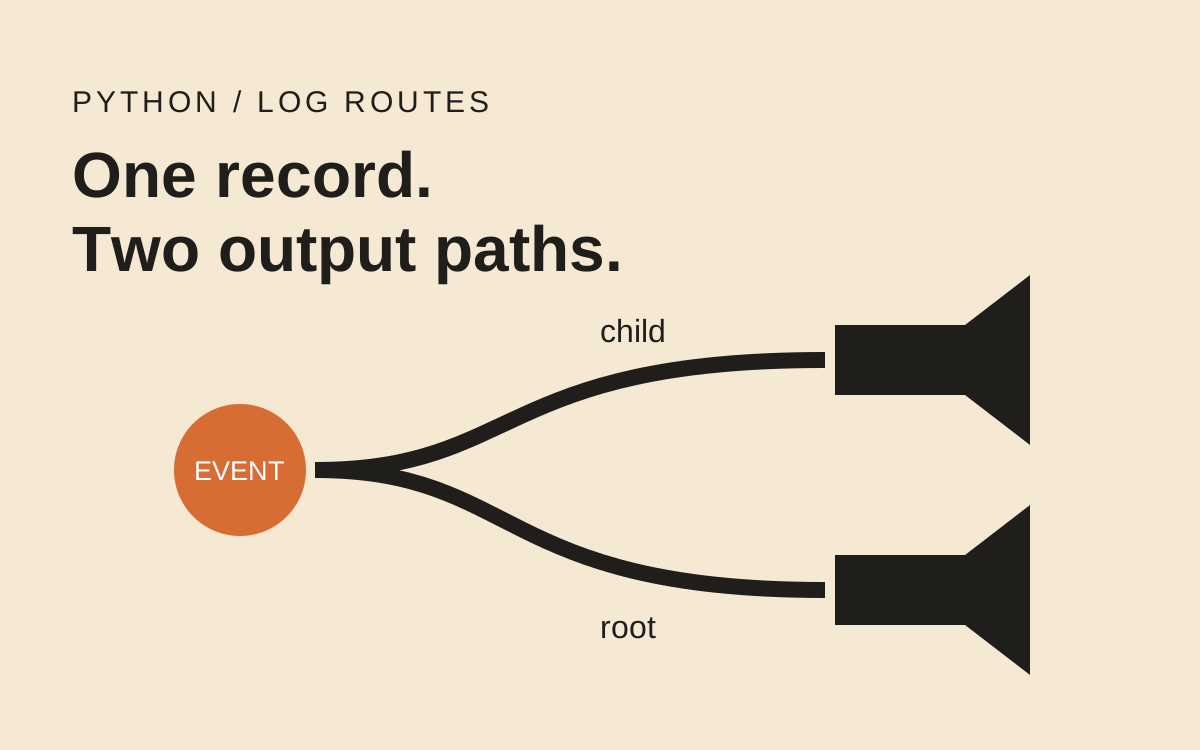
A named logger can handle a record locally and then pass it to ancestor handlers through propagation. Logger names form a hierarchy separated by dots. Asking for a logger with the same name returns the existing object; constructing a fresh handler and attaching it during every setup call still adds another output path. [1][3]
The root logger does not have to emit the event itself to receive it. That explains a common surprise: a library helper appears to own the message, but a root console handler prints it again. Changing the root logger's level is also an unreliable repair. Propagated records are passed directly to ancestor handlers; those handlers apply their own thresholds. [1]
The following standalone fixture deliberately creates the broken topology. It uses an in-memory stream, so the output count is observable without a log platform. Run it as a disposable script, away from application startup. The helper names and message are illustrative.
import io
import logging

sink = io.StringIO()
root = logging.getLogger()
root.handlers.clear()  # isolated fixture only
root.setLevel(logging.INFO)
root.addHandler(logging.StreamHandler(sink))
worker = logging.getLogger("billing.worker")
worker.handlers.clear()
worker.setLevel(logging.INFO)
worker.propagate = True

def setup_worker():
    worker.addHandler(logging.StreamHandler(sink))

setup_worker()
setup_worker()
worker.info("event=fixture-invoice-ready")
assert len(sink.getvalue().splitlines()) == 3
Scenario: the assertion expects three lines from a single call: each child handler writes once, and the root handler writes once. There is no billing transaction, network request or retry in this fixture. The example isolates handler ownership from business behavior.
Do not copy the clearing operations into a running service. A framework, test runner or telemetry integration may own those handlers. Removing them can silently eliminate required output. The fixture resets global state because it runs in a fresh disposable interpreter; the production repair should change the configuration source that created the unwanted route.
What should the route inventory show?#
Inspect each logger on the path, including its handlers and propagation flag. Start with the exact logger name from the duplicated record. Looking only at the root misses locally attached handlers; looking only at the child misses inherited output. Python exposes the direct handler list separately from hasHandlers(). [1]
def describe_route(logger):
    while logger is not None:
        print({
            "logger": logger.name,
            "level": logging.getLevelName(logger.level),
            "propagate": logger.propagate,
            "handlers": [type(h).__name__ for h in logger.handlers],
        })
        if not logger.propagate:
            break
        logger = logger.parent

describe_route(worker)
Take the inventory after the framework has completed startup, not only before application imports. Configuration order can explain why a small script behaves correctly while a hosted worker duplicates output. Compare the state before and after the suspected setup hook and again after any reload cycle.
hasHandlers() answers whether a handler can be found along the logger hierarchy. It does not answer whether this module already installed its own handler. A guard based on that method can therefore skip necessary local configuration merely because an ancestor has a handler. Checking logger.handlers answers a narrower question, but still does not establish who owns the handlers or whether their destinations are equivalent. [1]
Record intended destinations, too. A console handler and an audit file handler may both be correct. Duplicate text in distinct destinations is a deliberate routing decision. The defect is an unexpected extra copy at a destination that is supposed to receive a single event. Avoid reducing the investigation to “there must be only one handler everywhere.”
Choose an owner for the console destination#
For an application you control, configure console output at the entry point and let ordinary module loggers propagate to it. Library modules should request named loggers and emit records without installing console handlers. Python's cookbook assigns logging configuration to the application rather than the library. [3]
This small configuration expresses that ownership. It explicitly removes direct handlers from the example application's logger while retaining propagation. disable_existing_loggers is set deliberately because disabling unrelated loggers is a different change from repairing duplicate output. Read the framework's logging contract before adopting it. [2]
from logging.config import dictConfig

CONFIG = {
    "version": 1,
    "disable_existing_loggers": False,
    "formatters": {
        "plain": {"format": "%(process)d %(name)s %(message)s"}
    },
    "handlers": {
        "console": {
            "class": "logging.StreamHandler",
            "formatter": "plain",
            "stream": "ext://sys.stderr",
        }
    },
    "loggers": {
        "billing.worker": {"handlers": [], "propagate": True}
    },
    "root": {"level": "INFO", "handlers": ["console"]},
}

dictConfig(CONFIG)  # application entry point
The complete application configuration should include every route it owns. This example is deliberately small and does not configure access logs, audit retention or a telemetry exporter. A central configuration can simplify review, but it can also replace framework defaults if applied at the wrong point in startup. Compare the resulting graph with the application's required outputs.
There is a valid alternative. A component can own an isolated destination and stop propagation at that boundary. In that design, propagate=False is part of an intentional route. It becomes dangerous when applied indiscriminately: removing the ancestor path can also remove the only path to an organization's central collector. Inspect the whole route before choosing it. [1]
What if changing the root level appears to help?#
Inspect the handler threshold before accepting that repair. A record emitted by a child logger can reach an ancestor handler without being rechecked against the ancestor logger's level. Raising the root logger level may affect calls emitted directly at the root while leaving the child's propagated record untouched. The handler's own level is the relevant output gate at that point. [1]
In the disposable fixture, leave the child at INFO and raise the root to ERROR. Emit another single-line marker and inspect the stream. Then raise only the root handler to ERROR and compare again. The differing counts explain why a level change can seem inconsistent when you inspect only logger attributes. Restore the fixture after the experiment; this is a diagnostic comparison, not the recommended configuration.
There is a second failure branch: setting the child's propagation to false makes the root copy disappear, but both locally attached handlers still write. If output drops from several copies to fewer copies, the symptom improved while repeated setup remains broken. That is why the acceptance test runs setup again instead of stopping after the first cleaner console output.
For a hosted process, write down which startup stage owns each setting and which later stage may replace it. Test the final assembled process when possible. A library's isolated test can prove its own emission behavior while missing a handler installed by the hosting application after import. Keep the local fixture and the hosted-process check as separate pieces of evidence.
How do you prove repeated setup is safe?#
Test output behavior after the same initialization sequence that runs in the service. Counting handlers is useful evidence, but the acceptance criterion is the event count at each intended sink. A handler can forward to another handler, and separate handler objects can still target the same stream. The logging tutorial describes that separation between logger, handler and destination. [4]
For the illustrative worker, capture the console stream, apply the application configuration, emit a marker, apply the configuration again and emit another marker. Each marker should appear once. Also emit a warning from a dependency and confirm it still appears. A repair that removes duplicates by losing dependency warnings has failed.
Include a higher-severity event, a suppressed debug event and an exception with a traceback. Check logical records rather than assuming every newline is a separate record: a traceback intentionally spans lines. In a structured pipeline, parse the emitted events and compare identifiers. In a text fixture, use single-line markers for counting and inspect the exception separately.
Framework reloads and multiple worker processes need their own acceptance test. Different process identifiers may explain repeated startup messages without any local handler duplication. A multi-process application also needs a deliberate log transport design; the cookbook discusses the limits of writing directly to a shared file from multiple processes. Do not treat the standalone fixture as verification of that deployment. [3]
The same distinction appears in asyncio timeout investigations: a visible timeout or repeated message does not prove the underlying operation stopped or ran twice. If business retries are involved, inspect the durable action identity independently of the logging repair.
- Compare raw process output with the collector using the same diagnostic event identifier.
- Inventory the route after final framework startup and after repeated configuration.
- Verify intended console, audit and dependency-warning destinations separately.
- Check that reloads and multiple processes explain their own startup events.
- Keep the previous configuration available until the replacement preserves required outputs.
Frequently asked questions#
- Does calling getLogger repeatedly add handlers?
- No. Calls with the same logger name return the same logger object. Duplication can arise when setup code repeatedly creates and attaches handlers to that shared object. Inspect the handler list and the initialization path rather than replacing normal module-level logger lookup. [1][3]
- Should every logger use propagate=False?
- No. Stopping propagation is appropriate when a component deliberately owns its output route. Applying it everywhere can remove the path to central logging. Keep propagation enabled for ordinary module loggers when the application entry point owns their destinations. [1]
- Does basicConfig always add another console handler?
- No. With its normal settings,
basicConfig()does nothing when the root logger already has handlers. Itsforceoption changes that behavior. Investigate manual handler attachment and framework configuration order before attributing duplication to repeated calls alone. [1] - Can the same record appear in different legitimate outputs?
- Yes. An application can intentionally send an event to a console stream and an audit destination. Define the expected count per destination. A single global handler count is a poor acceptance criterion when the logging design includes different outputs or severity thresholds. [4]