Next.js hydration errors: find the first render mismatch
The browser must start from the markup the server actually produced. Trace the first difference before disabling server rendering.
Quick answer
A Next.js hydration mismatch means the server output and initial browser render disagree. Inspect the first differing element, then check invalid HTML, browser-only state, time-dependent values and HTML mutation. Keep the initial render deterministic. Move genuinely client-only work behind an appropriate client boundary instead of suppressing an unexplained warning.
On this page
A Next.js hydration error means the HTML delivered by the server and the first tree rendered in the browser disagree. Find the first differing value or element, then make that initial render deterministic. Adding use client does not, by itself, remove server prerendering or fix the disagreement. [1][2]
Why does the saved theme break the first render?#
Consider an illustrative preference switch. The server cannot read the visitor’s local storage, so it renders Light. The browser finds a saved Dark preference and renders Dark immediately. Both branches look reasonable in isolation. Together they ask React to attach behavior to markup that describes a different starting state. The final page can look correct after recovery, which is why a screenshot alone is a poor reproduction.
'use client';

export function ThemeLabel() {
  // Illustrative defect: the first output depends on the environment.
  const theme = typeof window === 'undefined'
    ? 'light'
    : window.localStorage.getItem('theme') ?? 'light';
  return <span>Theme: {theme}</span>;
}
With theme=dark saved in the browser, the two labels differ. The issue is the value used during rendering, not the presence of a browser guard. Next.js lists browser-only APIs and environment checks in rendering logic among common causes. React expects the initial client output to match the server output. [1][2]
'use client';
import { useEffect, useState } from 'react';

export function ThemeLabel() {
  const [theme, setTheme] = useState<string | null>(null);
  useEffect(() => {
    try {
      setTheme(window.localStorage.getItem('theme') ?? 'light');
    } catch {
      setTheme('light'); // Storage can be unavailable.
    }
  }, []);
  return <span>Theme: {theme ?? 'loading'}</span>;
}
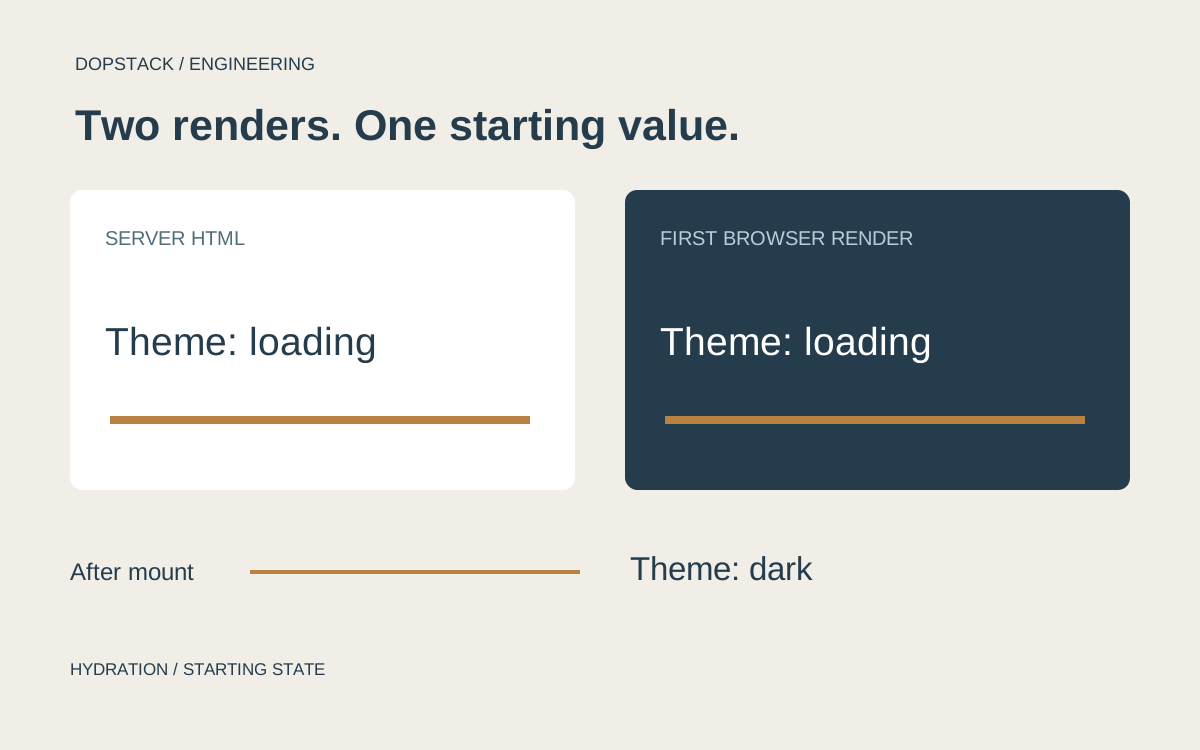
Here the server and first browser render both say loading. The effect reads the preference after mounting and triggers a later update. This is an illustrative repair for a small display label, not a complete theme system. A whole-page theme has additional concerns: an initial color flash, stylesheet application and an accessible preference control. If the server already knows an authoritative preference, passing the same serialized value to the client may be the better design.
Conceptual illustration
Two renders must start from the same value
Server HTML
Theme: loading
First client render
Theme: loading
After mount
Read saved preference
State update
Theme: dark
To reproduce the defect, save a dark preference through your application’s normal control, then load the route directly. Compare with cleared storage. Do not start by changing the dependency tree or suppressing the warning: those edits add variables before the failing value has been identified. The snippets show the mechanism and have not been run against a particular application.
Which render should you compare?#
Compare the response the browser received with the first render it tries to hydrate. React expects the rendered content to match the server HTML and treats mismatches as bugs. A page that looks correct after an effect runs can still have started from a different tree. [2]
Record the affected route, navigation path, account state and browser conditions. Reproduce through a direct page load as well as client navigation. Preserve the warning and the first differing node before changing code. A screenshot of the final page is useful for appearance, but is not evidence that hydration began consistently.
| Difference | Inspect first | Candidate repair |
|---|---|---|
| Unexpected element structure | Invalid nesting or browser HTML repair | Correct the markup |
| Different text or timestamp | Initial data, locale and time dependency | Serialize a common starting value |
| Different browser state | Storage or browser APIs read during render | Use a deterministic initial state |
| Difference appears only after delivery | Extensions or response transformation | Isolate the modifying layer |
Is browser-only state leaking into the initial render?#
Next.js calls out checks such as typeof window and direct use of browser-only APIs in rendering logic. A branch that produces different markup when a browser exists is not automatically hydration-safe merely because it lives in a client component. The initial output still needs a deliberate contract. [1]
Use a stable initial view whose meaning is honest. Render a neutral preference state or a loading placeholder that both sides can produce. Read browser-only information after mounting where appropriate, then update the component. Avoid showing an incorrect personalized state as though it were confirmed.
React effects run on the client, not during server rendering. That makes an effect a suitable place for some browser-only synchronization, but it does not justify moving all data loading there. Effects also follow the Rules of Hooks: do not call one conditionally to make the warning disappear. [3]
Separate the HTML response from the repaired page#
Keep two views of the problem. The network response shows what arrived from the server. The Elements panel shows the DOM after browser parsing and possibly after React has recovered. If the response already contains an invalid nesting relationship, investigate that before blaming an effect. The browser’s parsing behavior can make the live DOM differ from a developer’s JSX mental model. [1]
Use the warning’s component stack as a route into the code, then work outward to the earliest unstable input. A displayed timestamp may be computed in two time zones; a generated identifier may depend on call order; a responsive branch may choose different elements. Write down the actual server value and first browser value. Saying “the header mismatches” is less useful than saying which text, attribute or child order differed.
| Variation | Keep fixed | What a changed result suggests |
|---|---|---|
| Direct load versus client navigation | Route and account | The initial document path matters |
| Saved preference versus empty storage | Build and browser | A browser-held value participates |
| Clean browser profile | Route and build | An extension may modify the DOM |
| Same serialized timestamp | Locale and route | Independent time calculation participates |
These are diagnostic comparisons, not root-cause proofs. An extension-free success still needs an explanation of what was modified. A development-only reproduction still needs investigation of the delivered build. Change one input, preserve the result, and stop broadening the experiment once a specific cause can be reproduced.
When should you use a client-only boundary?#
Next.js documents disabling prerendering for a particular component as one possible response. Our decision rule is to reserve that choice for an element whose first meaningful output actually depends on the browser. Before applying it, identify which content and interaction would become unavailable in the initial server response. [1]
For a small browser integration, isolate the integration. Do not turn an entire article, navigation tree or product page into client-only content to hide one unstable widget. Document the intended placeholder and verify that loading, keyboard access and layout remain usable while the client code arrives.
Why is suppressHydrationWarning not the default fix?#
The escape hatch suppresses a limited mismatch; it is not a diagnosis. React warns that suppressed mismatched text is not patched, and Next.js documents the one-level limit. If the value matters to the reader or controls an interaction, decide which output should be authoritative before hiding the warning. [1][2]
Ask whether the difference is unavoidable, isolated and understood. A display-only timestamp can have a different decision from an account control or price. Do not apply suppression to a parent merely because its descendants produce several warnings; that removes evidence without establishing a coherent starting tree.
How should you verify the repair?#
- Test the original reproductionRepeat the exact route and browser conditions that produced the warning. Compare the first differing node, not only the finished screenshot.
- Vary the environment deliberatelyCheck the relevant locale, storage state and extension-free browser context. Keep a record of which variation exercises the proposed cause.
- Check the delivered buildVerify a production-like response path as well as development. Include any CDN or HTML transformation that participates in the actual delivery route.
What should the regression test preserve?#
Test the starting contract and the eventual interaction separately. For the preference label, the initial neutral state must agree and the saved preference must appear afterward. For a price or authorization control, a neutral placeholder may be unacceptable: the application may need a server-owned value or a disabled control until the state is known. The product requirement chooses the repair.
Include the direct-load path that originally failed. A test that arrives through navigation can miss the server document altogether. Also keep the small storage-access failure case: browsers and embedding policies can make storage unavailable. The useful regression is the original condition plus its expected behavior, not an assertion that a particular hook exists in the source code.
Hydration debugging questions#
- Can a client component still cause a hydration mismatch?
- Yes. The relevant question is whether its initial browser output agrees with the server-rendered content. A client designation does not explain a browser-only branch that changes that starting markup. Inspect the actual output. [1]
- Should all browser reads move into useEffect?
- Use an effect for appropriate browser-only synchronization while retaining a deterministic initial view. Do not mechanically move every operation there. Decide what the initial server response should contain and whether the later update is acceptable. [3]
- Is a clean final screenshot enough?
- No. The finished view may hide the initial disagreement. Reproduce the original load, inspect hydration warnings and compare the starting markup. Then verify that the chosen repair preserves interaction and layout under the relevant conditions.