Copilot model policy API: audit before changing access
GitHub made model-policy reads and writes generally available on October 19. Capture scope and inheritance before turning those endpoints into a policy reconciler.
Quick answer
The Copilot model policy API makes model-policy reads and writes available at enterprise, enterprise-team, enterprise-app and organization levels. Start with a read-only inventory of the active management mode, defaults and editable policy states. A policy response is not a final access decision for a person. Validate inherited settings and intended users before automating changes.
On this page
GitHub’s Copilot model policy API now supports retrieving and changing model policies across enterprise, enterprise-team, enterprise-app and organization scopes. Inventory the active management mode, inherited baseline and editable states first. A successful policy read or write does not by itself establish which models a particular person can use. [1][2][3]
This is a dated analysis of the October 19, 2026 announcement, checked against GitHub’s product and REST documentation on October 20. The release makes GET and PATCH endpoints generally available. The separate enterprise-teams mode for granular model access remains an opt-in preview in the administration documentation. API availability and policy-mode maturity are different facts. [1][2]
What became generally available?#
The announcement lists model-policy endpoints at four levels: enterprise, enterprise teams, enterprise apps and organizations. This allows a policy owner to capture settings and submit changes through the API instead of relying entirely on manual configuration. It does not authorize a reconciliation job to decide who should receive access or to change the enterprise’s management mode. Those remain governance decisions. [1]
Keep the before snapshot, proposed change, returned representation and follow-up read in the same review record. A small organization with infrequent changes may still be better served by a controlled manual process. Automating a poorly understood inheritance rule can make the same mistake across more scopes.
Start by recording whether the enterprise manages granular access through organizations or has opted into enterprise teams. The current admin guide explains that enabling teams mode deactivates organization-level model settings. It also describes rollback to the earlier policy state during the preview, rather than promising preservation of changes made after switching modes. Treat a mode change as a separate migration, not a repair for a failed API call. [2]
Why is an enabled value not a user’s access verdict?#
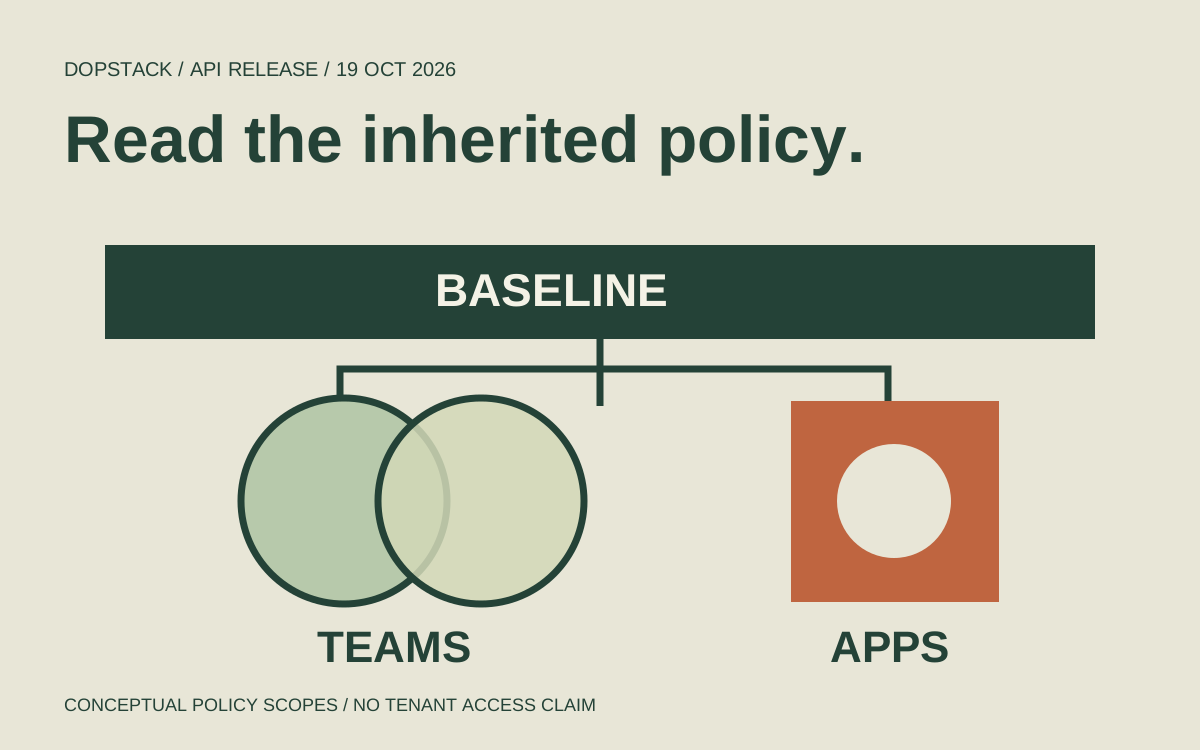
Because the response describes policy at a scope. The enterprise can enable, disable or delegate a model. In teams mode, a team cannot enable a model disabled by the enterprise, and team settings are additive to the baseline. A user in overlapping teams can receive access through any team that enables the delegated model. Reviewing one team’s row is therefore insufficient to establish that user’s complete access. [2]
The REST reference exposes fields such as policy_state, enterprise_policy_state and editable for team and app policy representations. It warns that those states are not final user-access decisions. An editable field helps explain whether the scope can change a setting; it is not evidence that all affected users have been identified. [3]
Optional also needs careful handling. The REST description says optional removes the stored team or app policy. That is not a universal denial. If your desired state means “this audience must never use the model,” first establish whether the baseline and all relevant memberships can express that requirement. Do not translate an organizational restriction into an optional field just because the API accepts it. [2][3]
How do you capture a useful read-only snapshot?#
Read the enterprise baseline and, when applicable to the active mode, the app policy separately. The example below uses the documented enterprise and app routes. Replace the enterprise slug with the authorized enterprise, use a GitHub CLI session configured for the required access, and store snapshots according to your organization’s administrative-data policy. These commands were not executed against a tenant. [3]
# Read-only example for github.com; use an authorized gh session.
enterprise_slug='REPLACE_WITH_ENTERPRISE'
gh api --method GET \
  -H 'Accept: application/vnd.github+json' \
  -H 'X-GitHub-Api-Version: 2026-03-10' \
  "/enterprises/${enterprise_slug}/copilot/model-policies" \
  > enterprise-model-policies.json

# Relevant when inspecting the enterprise app policy scope.
gh api --method GET \
  -H 'Accept: application/vnd.github+json' \
  -H 'X-GitHub-Api-Version: 2026-03-10' \
  "/enterprises/${enterprise_slug}/copilot/apps/model-policies" \
  > app-model-policies.json
For these enterprise reads, the reference permits enterprise owners and users with read_enterprise_ai_controls. It lists read:enterprise for classic personal access tokens and OAuth app tokens; supported GitHub App tokens need Enterprise AI controls read permission. Writes have a separate permission requirement. Select the narrow access appropriate to the job instead of giving an inventory process write authority. [3]
Check each request’s exit status and response before consuming a file as a valid snapshot. Authentication failure, missing authorization, a wrong resource or service unavailability is not an empty policy. Also record the enterprise, endpoint, API version and observation time outside the response. Record which enterprise each file describes and when each read completed.
Work through a delegated-access decision#
Scenario: an illustrative enterprise already uses teams mode. Its inventory shows modelX delegated to teams and apps. The app representation is optional and editable. The owner wants trained members of a platform team to receive modelX, while agent apps should not gain a new model grant. ModelX is a placeholder, not a currently supported model identifier or a recommendation about model quality.
The tempting change is to set modelX enabled at the enterprise level because that looks like one simple request. That would conflict with the intended narrow audience: the documented enterprise baseline applies across teams, while app access has its own scope in teams mode. Keep the baseline delegated and review the intended team setting, memberships and app state together. [2]
| Record field | Before or intended value | Review consequence |
|---|---|---|
| Management mode | Enterprise teams preview already enabled | Do not switch modes inside this change |
| Enterprise model policy | Delegate modelX to teams/apps | Do not replace delegation with enterprise-wide enabled |
| Target audience | Trained platform-team members | Inspect overlapping memberships and existing grants |
| App policy | Optional, editable; preserve existing state | Do not add an app grant as a side effect |
| Change scope | The reviewed team policy only | Resolve numeric team identifier and permissions from current REST docs |
| Verification | Read policy back and check representative effective access | Keep observed policy and user checks as separate evidence |
A user in both platform and another team can still have access through another grant. Likewise, a user excluded from the selected team may already be covered by the enterprise baseline or a different team. If the requirement is an exclusive audience, enumerate those paths before treating one team update as sufficient. The admin guide explicitly describes the additive union across memberships. [2]
For apps, optional clears the app-specific stored policy in the REST description. In this case the decision is to preserve the inspected app state, not to infer that optional proves a company-wide prohibition. If a requirement demands a stronger restriction, resolve the effective model rules before proceeding. This is why the table records intent and verification separately. [3]
What should happen before and after a write?#
Before a write, record the target scope, exact current model identifier, current policy state, desired state, approval and expected audience. Read again immediately before applying the approved difference. If the state has changed since review, stop and reconcile the difference rather than overwriting another administrator’s decision. This is our proposed change process; it is not a claim that these endpoints provide a documented compare-and-swap transaction.
- Inventory owner: capture mode, baseline, defaults and the relevant delegated scopes with observation times.
- Policy owner: state the intended audience and whether the requirement is an additional grant or an exclusive restriction.
- Reviewer: check scope, inherited locks, membership overlap and the exact model identifier returned by the API.
- Executor: use the documented permission and accepted state for the selected endpoint; preserve unrelated settings.
- Verifier: read the returned representation and fetch the scope again, then inspect representative intended and unintended access paths.
- Recovery owner: retain the prior state and verify the compensating change before relying on it as restoration.
The docs say locked models cannot be updated. A write error should lead to checking inherited policy and the active mode, not a broader enterprise enablement request made just to make the error disappear. Similarly, a returned enabled state should not close the change record until its scope matches the approved decision. [2][3]
Use supported current model identifiers from the response. Do not hard-code a display name copied from a sample, assume every listed model is available in every client surface, or derive a cost claim from a policy value. This article contains no tenant experiment, model comparison, cost estimate or measured rollout result. Revisit the contract when models, the management mode or the documented API changes.
Model policy is one part of an AI rollout. The agent-permission design asks who an agent can act for and which business actions it may perform. The production AI workflow guide connects that authority to verification and failure handling. A model becoming available should not silently expand either authority.
Questions about the model policy API#
- Does API general availability make teams mode generally available?
- No. The October19 announcement makes the GET and PATCH endpoints generally available. At this review, the administration guide still labels granular enterprise-teams model access an opt-in preview. Record the two statuses separately when planning an inventory job or a policy-mode migration. [1][2]
- Can a team enable a model the enterprise disabled?
- The administration guide says it cannot. Teams add access above the enterprise baseline where delegation permits it. If the inherited policy is locked, review the enterprise decision with its owner instead of attempting to override it through the team endpoint. [2][3]
- Does optional mean the model is forbidden?
- Not universally. The REST description uses optional to remove a stored team or app policy. Effective access still depends on inherited policy and, for users, relevant memberships. State whether your requirement is to clear a grant or to prohibit access before choosing an API value. [2][3]
- Can I prove a user’s access from one team response?
- No. The REST documentation warns that these policy states are not final user-access decisions. In teams mode, memberships are additive, so another team may grant access. Review the baseline and relevant membership paths, then verify representative users and client surfaces separately. [2][3]
- Should the first automation job have write permission?
- An inventory job can start with the documented read access for the relevant endpoints. Add a separate reviewed write path only when scope, desired state and verification are defined. This keeps observation useful while the team resolves inheritance or endpoint-contract questions. [3]